
第 5 章: ユーザーとパスワード
ここまでのブログには、誰が操作しているかという区別がありませんでした。この章でユーザーを追加します。用意するのは、パスワードハッシュを保存するテーブル、ハッシュ化を受け持つモデル、セッションとそれに伴う CSRF 保護、そして手で組み立てる登録・ログイン・ログアウトです。そのあとプロフィールページをテストで仕様にしてエージェントに任せ、エージェントがモデルに手を付ける前に guren context User から何を受け取るのかも確認します。
第 5 章: ユーザーとパスワード
ここまでのブログには、誰が操作しているかという区別がありませんでした。この章でユーザーを追加します。用意するのは、パスワードハッシュを保存するテーブル、ハッシュ化を受け持つモデル、セッションとそれに伴う CSRF 保護、そして手で組み立てる登録・ログイン・ログアウトです。そのあとプロフィールページをテストで仕様にしてエージェントに任せ、エージェントがモデルに手を付ける前に guren context User から何を受け取るのかも確認します。
この一式は Guren のコマンド 1 つでまとめてインストールできますが、ここでは一度自分で組み立てます。そうしておけば、第 6 章でそのコマンドの出力を読むときに、各行が何のためにあるのかが分かります。
この章で学ぶこと:
- セッションを有効にすると加わるもの: cookie、ストア、すべての変更系リクエストに対する CSRF 保護
- パスワードをどう保存するか(パスワードそのものは保存しない)と、ハッシュ化をどこで行うか
this.auth.attempt()、login()、logout()、userOrFail()の働きと、ガードの役割- 第 4 章で書いたテストが失敗するようになる理由と、テストで CSRF トークンを用意する方法
guren context Userで得られるエンティティ単位のバンドルと、プロジェクト全体の地図との違い
開発サーバーを起動していなければ、起動しておきます。
bun run dev1. users テーブルをサインイン用に整える
雛形の users テーブルには、名前、メールアドレス、タイムスタンプの列しかありません。サインインできるようにするには、パスワードハッシュを保存する列と、アカウント間で重複できないメールアドレスの 2 つが必要です。db/schema.ts を次の内容に置き換えます。
db/schema.tsimport { sqliteTable, integer, text } from '@guren/orm/drizzle/sqlite'

export const users = sqliteTable('users', {
  id: integer('id').primaryKey({ autoIncrement: true }),
  name: text('name').notNull(),
  email: text('email').notNull().unique(),
  passwordHash: text('password_hash').notNull(),
  rememberToken: text('remember_token'),
  createdAt: text('created_at').notNull().$defaultFn(() => new Date().toISOString()),
})

export const posts = sqliteTable('posts', {
  id: integer('id').primaryKey({ autoIncrement: true }),
  title: text('title').notNull(),
  body: text('body').notNull(),
  createdAt: text('created_at').notNull().$defaultFn(() => new Date().toISOString()),
})
列名を passwordHash にしているのには意味があります。データベースにはパスワードそのものを保存せず、ソルト付きの低速なハッシュ関数にパスワードを通した結果だけを保存します。rememberToken は「ログイン状態を保持する」cookie に使う秘密の値で、ほとんどのセッションでは使わないため nullable にしています。
bun run db:make add_passwords_to_usersbun run db:migrate生成されたマイグレーションを開いてみてください。先頭に列ごとの ALTER TABLE users ADD 文が 2 つあり、そのうえでテーブルを作り直しています。新しい形のテーブルを作り、行をコピーし、古いテーブルを削除してから名前を付け替える、という手順です。
最初の ALTER はデフォルト値の無い NOT NULL 列を追加しますが、SQLite がこれを受け付けるのは行が 1 つも無いテーブルに限られます。users テーブルにはまだ行が無いので、マイグレーションは最後まで適用されます。第 6 章ではデータの入ったテーブルを変更しますが、そのとき drizzle-kit が書くのはテーブルの作り直しだけです。
2. パスワードをハッシュ化するモデル
app/Models/User.ts を作成します。
app/Models/User.tsimport { AuthenticatableModel, defineModel } from '@guren/core'
import { users } from '../../db/schema.js'

export type UserRecord = typeof users.$inferSelect

export class User extends defineModel(users, {
  base: AuthenticatableModel,
  // Derived from the plain `password`, so callers never set it directly
  optionalOnCreate: ['passwordHash'],
  requireOnCreate: ['password'],
  // Never serialized by Model.serialize() and stripped from auth.user()
  hidden: ['passwordHash', 'rememberToken'],
}) {
}
指定しているオプションは 3 つで、それぞれが 1 つの役割を持っています。
base: AuthenticatableModelを指定すると、このモデルはただの行ではなくユーザーとして扱われます。仮想フィールドpasswordが追加され、User.create({ name, email, password: 'secret' })と書けばパスワードがハッシュ化されてpasswordHashに保存されます。ハッシュ化はモデルが受け持つので、この章のコントローラーはどれもハッシュ関数を呼びません。optionalOnCreate/requireOnCreateで、create に渡すペイロードの型をこれに合わせます。passwordは必須になり、passwordHashは渡せなくなります。hiddenに挙げたハッシュと remember トークンは、どのシリアライズ結果にも含まれなくなります。認証コンテキストがページに渡すユーザーオブジェクトも例外ではありません。第 4 章では、passwordHashがブラウザに届かないようリソース層で防ぐと説明しました。hiddenは、同じ扉に付ける 2 つ目の鍵にあたります。
3. セッションと、モデルを指定するプロバイダー
セッションは、どのリクエストが誰から来たものかをサーバーが覚えておく仕組みで、id を入れた cookie と、その id に対応するデータを持つストアからなります。createApp に auth オプションを渡すと、Guren はセッションミドルウェアと、それに伴う CSRF 保護をマウントします。
このほか認証の仕組みには、どのモデルがユーザーを表し、どの列で照合するかを教える必要があります。その役目を持つのが、アプリ内に置くプロバイダーです。app/Providers/AuthProvider.ts を作成します。
app/Providers/AuthProvider.tsimport { ServiceProvider, shareInertiaProps, AUTH_CONTEXT_KEY } from '@guren/core'
import type { AuthContext, AuthManager } from '@guren/core'
import { User } from '../Models/User.js'

export default class AuthProvider extends ServiceProvider {
  register(): void {
    const auth = this.container.make<AuthManager>('auth')
    auth.useModel(User, {
      usernameColumn: 'email',
      passwordColumn: 'passwordHash',
      rememberTokenColumn: 'rememberToken',
      credentialsPasswordField: 'password',
    })
  }

  boot(): void {
    shareInertiaProps(async (ctx) => {
      const auth = ctx.get(AUTH_CONTEXT_KEY) as AuthContext | undefined
      return { auth: { user: await auth?.user() } }
    }, this.container)
  }
}
useModel は web という名前のガードを登録します。ガードは、リクエストを受け取るとセッションを読んで相手が誰かを判定し、資格情報を受け取るとハッシュを比較して正しいかどうかを判定します。shareInertiaProps はすべてのページの props に auth.user を追加するので、どのコンポーネントからでもサインイン中のユーザーがいるかを確認できます。ゲストの場合は null になり、hidden を指定しているのでハッシュが含まれることはありません。
これを有効にするため、src/app.ts を次の内容に置き換えます。
src/app.ts// Every zod schema built after this import parses through a compiled fast
// path. Keep it the first import so it runs before any module that defines
// schemas. It honors z.config({ jitless: true }) for CSP-restricted runtimes
// and never throws — unsupported schemas keep the regular parser. One caveat:
// on invalid input, refinements/transforms can run twice (fast path, then
// fallback), so keep .refine()/.transform() free of side effects.
import 'zod/compile'
import { createApp } from '@guren/core'
import AuthProvider from '../app/Providers/AuthProvider.js'
import database from '../config/database.js'
import env from '../config/env.js'
import http from '../config/http.js'
import { registerWebRoutes } from '../routes/web.js'

const app = createApp({
  // Rendered into every server-rendered document. Replace public/favicon.svg
  // with your own artwork, or add more tags here (Open Graph, apple-touch-icon).
  inertia: {
    document: {
      head: '<link rel="icon" type="image/svg+xml" href="/favicon.svg" />',
    },
  },
  env,
  config: [database, http],
  routes: registerWebRoutes,
  providers: [AuthProvider],
  // Sessions and CSRF protection: an in-memory session store by default,
  // which chapter 14 replaces with a database-backed one.
  auth: {},
  // Translations live in lang/<locale>/*.json. Add locales to `supported`
  // and the request locale is detected from ?locale=, a locale cookie, or
  // Accept-Language. `guren codegen` types the keys for t()/useTranslation().
  i18n: { supported: ['en'] },
})

export default app
変更点は、AuthProvider の import、providers への AuthProvider の追加、そして auth: {} とその上のコメントです。テストを実行します。
bun test4. セッションで失敗するようになったテストと、それが正しい理由
フォームを送信するテストが、すべて 403「CSRF token mismatch」で失敗するようになりました。投稿まわりのコードは何も変えていません。アプリがセッションを持つようになり、そのセッションを守る必要が出てきたためです。
クロスサイトリクエストフォージェリ(CSRF)は、別のサイトのページから、利用者のブラウザにこのアプリへのフォームを送信させる攻撃です。ブラウザはセッション cookie を付けて送信するので、アプリ側では利用者が意図したリクエストと見分けが付きません。そこでアプリは cookie にトークンを入れておき、POST、PUT、PATCH、DELETE のたびに、そのトークンをヘッダーかフォームフィールドで送り返すよう求めます。別のサイトからはこの cookie を読めないので、トークンを用意できません。
Inertia のフォームはこの処理を自動で行います。form.post() が XSRF-TOKEN cookie の値を X-XSRF-TOKEN ヘッダーに写すので、ブラウザで操作している分には何も問題が起きませんでした。
一方、テストはブラウザではないので、この変化で失敗します。TestApp には、この場面のための withCsrf() があります。withCsrf() は GET を 1 回送って受け取った cookie とトークンを保持し、以降のすべてのリクエストにそれらを付けて送るクライアントを返します。
tests/PostController.test.ts を次の内容に置き換えます。変更点は、変更系のリクエストを csrf 経由で送るようにしたことだけです。
tests/PostController.test.tsimport { beforeAll, beforeEach, describe, expect, it } from 'bun:test'
import { TestApp } from '@guren/testing'
import app from '../src/app.js'
import { resetDatabase } from '../config/database.js'
import { Post } from '../app/Models/Post.js'

describe('PostController', () => {
  let http: TestApp
  let csrf: TestApp

  beforeAll(async () => {
    http = await TestApp.fromApp(app)
    csrf = await http.withCsrf()
  })

  beforeEach(async () => {
    await resetDatabase()
  })

  it('lists posts, newest first', async () => {
    await Post.create({ title: 'First post', body: 'Hello' })
    await Post.create({ title: 'Second post', body: 'Again' })

    const response = await http.get('/posts').assertOk()
    const html = await response.text()
    const first = html.indexOf('First post')
    const second = html.indexOf('Second post')
    if (first === -1 || second === -1 || second > first) {
      throw new Error('expected the newer post to be listed before the older one')
    }
  })

  it('paginates ten posts per page', async () => {
    for (let i = 1; i <= 11; i++) {
      await Post.create({ title: `Post ${String(i).padStart(2, '0')}`, body: `Body number ${i}` })
    }

    const firstPage = await http.get('/posts').assertOk()
    await firstPage.assertBodyContains('Post 11')
    await firstPage.assertBodyContains('Post 02')
    expect(await firstPage.text()).not.toContain('Post 01')

    const secondPage = await http.get('/posts?page=2').assertOk()
    await secondPage.assertBodyContains('Post 01')
    expect(await secondPage.text()).not.toContain('Post 02')
  })

  it('shows one post', async () => {
    const post = await Post.create({ title: 'Read me', body: 'The whole body' })

    const response = await http.get(`/posts/${post.id}`).assertOk()
    await response.assertBodyContains('The whole body')
  })

  it('answers 404 for a post that does not exist', async () => {
    await http.get('/posts/999').assertNotFound()
  })

  it('serves the form for a new post', async () => {
    await http.get('/posts/create').assertOk()
  })

  it('stores a post and redirects to it', async () => {
    await csrf.post('/posts', { title: 'Written in a test', body: 'By a test' }).assertRedirect()

    const post = await Post.where('title', 'Written in a test').first()
    expect(post).not.toBeNull()
    expect(post?.body).toBe('By a test')
  })

  it('rejects an empty post with a message per field', async () => {
    await csrf
      .post('/posts', { title: '', body: '' })
      .assertStatus(422)
      .assertJsonPath('errors.title.0', 'Title is required')
      .assertJsonPath('errors.body.0', 'Body is required')
  })

  it('serves the edit form with the post in it', async () => {
    const post = await Post.create({ title: 'Before', body: 'The old body' })

    const response = await http.get(`/posts/${post.id}/edit`).assertOk()
    await response.assertBodyContains('The old body')
  })

  it('updates a post and redirects to it', async () => {
    const post = await Post.create({ title: 'Before', body: 'The old body' })

    await csrf.put(`/posts/${post.id}`, { title: 'After', body: 'The new body' }).assertRedirect(`/posts/${post.id}`)

    const updated = await Post.findOrFail(post.id)
    expect(updated.title).toBe('After')
    expect(updated.body).toBe('The new body')
  })

  it('rejects an invalid update with the same messages', async () => {
    const post = await Post.create({ title: 'Before', body: 'The old body' })

    await csrf
      .put(`/posts/${post.id}`, { title: '', body: 'Still here' })
      .assertStatus(422)
      .assertJsonPath('errors.title.0', 'Title is required')
  })

  it('deletes a post and redirects to the list', async () => {
    const post = await Post.create({ title: 'Doomed', body: 'Gone soon' })

    await csrf.delete(`/posts/${post.id}`).assertRedirect('/posts')

    expect(await Post.find(post.id)).toBeNull()
  })
})
bun testテストがまた通るようになりました。これだけでも 1 つのまとまった変更なので、ここで一度コミットしておきます。
bunx guren gategit add -A
git commit -m "feat: add the user model, sessions, and CSRF protection"5. 登録とログインのテストを先に書く
作るコントローラーは 2 つで、どちらも先にテストで仕様にします。まずは登録です。
tests/RegisterController.test.tsimport { beforeAll, beforeEach, describe, expect, it } from 'bun:test'
import { TestApp } from '@guren/testing'
import app from '../src/app.js'
import { resetDatabase } from '../config/database.js'
import { User } from '../app/Models/User.js'

describe('RegisterController', () => {
  let http: TestApp

  beforeAll(async () => {
    http = await TestApp.fromApp(app)
  })

  beforeEach(async () => {
    await resetDatabase()
  })

  it('serves the registration form', async () => {
    await http.get('/register').assertOk()
  })

  it('creates the user, stores a hash rather than the password, and redirects', async () => {
    const csrf = await http.withCsrf('/register')
    await csrf
      .post('/register', {
        name: 'Ada',
        email: 'ada@example.com',
        password: 'correct horse battery',
        passwordConfirmation: 'correct horse battery',
      })
      .assertRedirect('/')

    const user = await User.where('email', 'ada@example.com').first()
    expect(user).not.toBeNull()
    expect(user?.passwordHash).not.toBe('correct horse battery')
    expect(user?.passwordHash.length).toBeGreaterThan(20)
  })

  it('rejects a short password with a message', async () => {
    const csrf = await http.withCsrf('/register')
    await csrf
      .post('/register', { name: 'Ada', email: 'ada@example.com', password: 'short', passwordConfirmation: 'short' })
      .assertStatus(422)
      .assertJsonPath('errors.password.0', 'Password must be at least 8 characters.')
  })
})
続いてログインとログアウトです。
tests/LoginController.test.tsimport { beforeAll, beforeEach, describe, it } from 'bun:test'
import { TestApp } from '@guren/testing'
import app from '../src/app.js'
import { resetDatabase } from '../config/database.js'
import { User } from '../app/Models/User.js'

describe('LoginController', () => {
  let http: TestApp

  beforeAll(async () => {
    http = await TestApp.fromApp(app)
  })

  beforeEach(async () => {
    await resetDatabase()
    await User.create({ name: 'Ada', email: 'ada@example.com', password: 'correct horse battery' })
  })

  it('serves the login form', async () => {
    await http.get('/login').assertOk()
  })

  it('signs in with the right password and redirects', async () => {
    const csrf = await http.withCsrf('/login')
    await csrf.post('/login', { email: 'ada@example.com', password: 'correct horse battery' }).assertRedirect('/')
  })

  it('rejects the wrong password with a message', async () => {
    const csrf = await http.withCsrf('/login')
    await csrf
      .post('/login', { email: 'ada@example.com', password: 'wrong' })
      .assertStatus(422)
      .assertJsonPath('errors.message.0', 'Invalid credentials.')
  })

  it('signs out and redirects home', async () => {
    const user = await User.where('email', 'ada@example.com').first()
    const csrf = await http.actingAs(user).withCsrf()
    await csrf.post('/logout').assertRedirect('/')
  })
})
登録のテストで検査している内容に注目してください。確かめているのは、パスワードがそのままでは保存されなかったことと、代わりに長い文字列が保存されたことです。この章でテストに守らせたい性質を 1 つだけ選ぶなら、これになります。最後のテストの actingAs(user) はサインイン済みのセッションの代わりになるもので、第 6 章と第 7 章でよく使います。
bun test7 つのテストが失敗し、どれも 404 です。
6. 登録とログインを手で組む
まずバリデーターを書きます。メールアドレスは検査と保存の前に小文字に変換するので、Ada@Example.com と ada@example.com は同じアカウントとして扱われます。
app/Http/Validators/RegisterValidator.tsimport { z } from 'zod'

export const RegisterSchema = z
  .object({
    name: z.string().trim().min(1, 'Name is required.').max(120, 'Name must be 120 characters or fewer.'),
    email: z.string().trim().min(1, 'Email is required.').toLowerCase().pipe(z.email('The email address is badly formatted.')),
    password: z.string().min(8, 'Password must be at least 8 characters.'),
    passwordConfirmation: z.string().min(1, 'Please confirm your password.'),
  })
  .refine((data) => data.password === data.passwordConfirmation, {
    message: 'Passwords do not match.',
    path: ['passwordConfirmation'],
  })

export type RegisterInput = z.infer<typeof RegisterSchema>
app/Http/Validators/LoginValidator.tsimport { z } from 'zod'

export const LoginSchema = z.object({
  email: z.string().trim().min(1, 'Email is required.').toLowerCase().pipe(z.email('The email address is badly formatted.')),
  password: z.string().min(1, 'Password is required.'),
})

export type LoginInput = z.infer<typeof LoginSchema>
次は登録コントローラーです。ハッシュ化はモデルが行うので、ここにはハッシュ化の処理がありません。
app/Http/Controllers/Auth/RegisterController.tsimport { Controller } from '@guren/core'
import { pages } from '@/.guren/pages.gen'
import { User } from '../../../Models/User.js'
import { RegisterSchema } from '../../Validators/RegisterValidator.js'

export default class RegisterController extends Controller {
  async show(): Promise<Response> {
    return this.inertia(pages.auth.Register, {})
  }

  async store(): Promise<Response> {
    const { name, email, password } = await this.validateBody(RegisterSchema)
    const user = await User.create({ name, email, password })

    await this.auth.login(user)
    return this.redirect('/')
  }
}
this.auth.login(user) はユーザーの id をセッションに書き込み、セッション id を新しいものに入れ替えます。サインイン前から存在したセッションを、サインイン後に使い回されないようにするためです。以降は、この cookie を持つリクエストであれば this.auth.user() が Ada を返します。
続いてログインコントローラーです。
app/Http/Controllers/Auth/LoginController.tsimport { Controller, ValidationException } from '@guren/core'
import { pages } from '@/.guren/pages.gen'
import { LoginSchema } from '../../Validators/LoginValidator.js'

export default class LoginController extends Controller {
  async show(): Promise<Response> {
    return this.inertia(pages.auth.Login, {})
  }

  async store(): Promise<Response> {
    const { email, password } = await this.validateBody(LoginSchema)

    const authenticated = await this.auth.attempt({ email, password })
    if (!authenticated) {
      throw ValidationException.withMessages({ message: 'Invalid credentials.' })
    }

    return this.redirect('/')
  }

  async destroy(): Promise<Response> {
    await this.auth.logout()
    this.auth.session()?.invalidate()
    return this.redirect('/')
  }
}
attempt() はメールアドレスでユーザーを探し、保存されているハッシュと照合してパスワードを検証し、成功すれば login() と同じ処理を行います。失敗した場合は、メールアドレスが登録済みかどうかに関わらず同じ時間をかけるので、攻撃者は応答時間から両者を見分けられません。同じ理由で、失敗は「パスワードが違う」とも「そのユーザーはいない」とも伝えず、メッセージが 1 つだけのバリデーションエラーとして返します。logout() はサインイン中のユーザーを忘れ、invalidate() はセッションそのものを破棄します。
ページは 2 つ用意します。どちらも、フォームが拒否されたときに Guren が値を入れる errors prop を使います。「Invalid credentials.」もこの prop で渡されます。
resources/js/pages/auth/Register.tsximport { Head, Link, useForm } from '@inertiajs/react'
import type { ValidationErrors } from '@guren/core'

interface Props {
  errors?: ValidationErrors<'name' | 'email' | 'password' | 'passwordConfirmation'>
}

interface RegisterForm {
  name: string
  email: string
  password: string
  passwordConfirmation: string
}

const inputClass =
  'mt-1 w-full rounded-g-ctl border border-g-line-strong bg-g-panel px-3 py-2 text-g-text transition outline-none placeholder:text-g-muted focus:border-transparent focus:outline-2 focus:-outline-offset-1 focus:outline-g-accent'

export default function Register({ errors = {} }: Props) {
  const form = useForm<RegisterForm>({ name: '', email: '', password: '', passwordConfirmation: '' })

  return (
    <>
      <Head title="Sign up" />
      <main className="min-h-screen bg-g-page font-sans text-g-text">
        <div className="mx-auto max-w-md px-6 py-12">
          <section className="rounded-g-card border border-g-line bg-g-panel p-8 shadow-g-card">
            <h1 className="text-2xl font-bold text-g-heading">Create an account</h1>
            {errors.message && <p className="mt-4 text-sm text-g-danger">{errors.message}</p>}
            <form
              className="mt-6 space-y-4"
              onSubmit={(event) => {
                event.preventDefault()
                form.post('/register')
              }}
            >
              <label className="block text-sm">
                Name
                <input type="text" value={form.data.name} onChange={(event) => form.setData('name', event.target.value)} className={inputClass} />
                {errors.name && <p className="mt-1 text-sm text-g-danger">{errors.name}</p>}
              </label>
              <label className="block text-sm">
                Email
                <input type="email" value={form.data.email} onChange={(event) => form.setData('email', event.target.value)} className={inputClass} />
                {errors.email && <p className="mt-1 text-sm text-g-danger">{errors.email}</p>}
              </label>
              <label className="block text-sm">
                Password
                <input type="password" value={form.data.password} onChange={(event) => form.setData('password', event.target.value)} className={inputClass} />
                {errors.password && <p className="mt-1 text-sm text-g-danger">{errors.password}</p>}
              </label>
              <label className="block text-sm">
                Confirm password
                <input type="password" value={form.data.passwordConfirmation} onChange={(event) => form.setData('passwordConfirmation', event.target.value)} className={inputClass} />
                {errors.passwordConfirmation && <p className="mt-1 text-sm text-g-danger">{errors.passwordConfirmation}</p>}
              </label>
              <button type="submit" disabled={form.processing} className="rounded-g-ctl bg-g-accent px-4 py-2 text-sm font-bold text-g-on-accent transition hover:bg-g-accent-down">
                Sign up
              </button>
            </form>
            <p className="mt-6 text-sm text-g-text-2">
              Already have an account?{' '}
              <Link href="/login" className="text-g-accent-text hover:underline">Sign in</Link>
            </p>
          </section>
        </div>
      </main>
    </>
  )
}
resources/js/pages/auth/Login.tsximport { Head, Link, useForm } from '@inertiajs/react'
import type { ValidationErrors } from '@guren/core'

interface Props {
  errors?: ValidationErrors<'email' | 'password'>
}

interface LoginForm {
  email: string
  password: string
}

const inputClass =
  'mt-1 w-full rounded-g-ctl border border-g-line-strong bg-g-panel px-3 py-2 text-g-text transition outline-none placeholder:text-g-muted focus:border-transparent focus:outline-2 focus:-outline-offset-1 focus:outline-g-accent'

export default function Login({ errors = {} }: Props) {
  const form = useForm<LoginForm>({ email: '', password: '' })

  return (
    <>
      <Head title="Sign in" />
      <main className="min-h-screen bg-g-page font-sans text-g-text">
        <div className="mx-auto max-w-md px-6 py-12">
          <section className="rounded-g-card border border-g-line bg-g-panel p-8 shadow-g-card">
            <h1 className="text-2xl font-bold text-g-heading">Sign in</h1>
            {errors.message && <p className="mt-4 text-sm text-g-danger">{errors.message}</p>}
            <form
              className="mt-6 space-y-4"
              onSubmit={(event) => {
                event.preventDefault()
                form.post('/login')
              }}
            >
              <label className="block text-sm">
                Email
                <input type="email" value={form.data.email} onChange={(event) => form.setData('email', event.target.value)} className={inputClass} />
                {errors.email && <p className="mt-1 text-sm text-g-danger">{errors.email}</p>}
              </label>
              <label className="block text-sm">
                Password
                <input type="password" value={form.data.password} onChange={(event) => form.setData('password', event.target.value)} className={inputClass} />
                {errors.password && <p className="mt-1 text-sm text-g-danger">{errors.password}</p>}
              </label>
              <button type="submit" disabled={form.processing} className="rounded-g-ctl bg-g-accent px-4 py-2 text-sm font-bold text-g-on-accent transition hover:bg-g-accent-down">
                Sign in
              </button>
            </form>
            <p className="mt-6 text-sm text-g-text-2">
              No account yet?{' '}
              <Link href="/register" className="text-g-accent-text hover:underline">Sign up</Link>
            </p>
          </section>
        </div>
      </main>
    </>
  )
}
最後にルートです。/logout はあえて POST にしています。状態を変える GET があると、第三者がそれをリンクにして利用者にクリックさせられるからです。
routes/web.tsimport { Router } from '@guren/core'
import HomeController from '../app/Http/Controllers/HomeController.js'
import AboutController from '../app/Http/Controllers/AboutController.js'
import ContactController from '../app/Http/Controllers/ContactController.js'
import PostController from '../app/Http/Controllers/PostController.js'
import RegisterController from '../app/Http/Controllers/Auth/RegisterController.js'
import LoginController from '../app/Http/Controllers/Auth/LoginController.js'
import { Post } from '../app/Models/Post.js'
import { PostPayloadSchema } from '../app/Http/Validators/PostValidator.js'
import { RegisterSchema } from '../app/Http/Validators/RegisterValidator.js'
import { LoginSchema } from '../app/Http/Validators/LoginValidator.js'

export function registerWebRoutes(router: Router): void {
  router.get('/', [HomeController, 'index'])
  router.get('/about', [AboutController, 'index']).name('about')
  router.get('/contact', [ContactController, 'index']).name('contact')

  router.get('/register', [RegisterController, 'show']).name('register')
  router.post('/register', { name: 'register.store', body: RegisterSchema }, [RegisterController, 'store'])
  router.get('/login', [LoginController, 'show']).name('login')
  router.post('/login', { name: 'login.store', body: LoginSchema }, [LoginController, 'store'])
  router.post('/logout', [LoginController, 'destroy']).name('logout')

  router.group('/posts', (posts) => {
    posts.get('/', [PostController, 'index']).name('posts.index')
    posts.get('/create', [PostController, 'create']).name('posts.create')
    posts.get('/:id', { bind: { id: Post }, name: 'posts.show' }, [PostController, 'show'])
    posts.get('/:id/edit', { bind: { id: Post }, name: 'posts.edit' }, [PostController, 'edit'])
    posts.post('/', { name: 'posts.store', body: PostPayloadSchema }, [PostController, 'store'])
    posts.put('/:id', { bind: { id: Post }, name: 'posts.update', body: PostPayloadSchema }, [PostController, 'update'])
    posts.delete('/:id', { bind: { id: Post }, name: 'posts.destroy' }, [PostController, 'destroy'])
  })

  // Health check endpoint for load balancers and uptime monitors
  router.get('/health', (c) => c.json({ status: 'ok' }))
}
bun run codegenbun test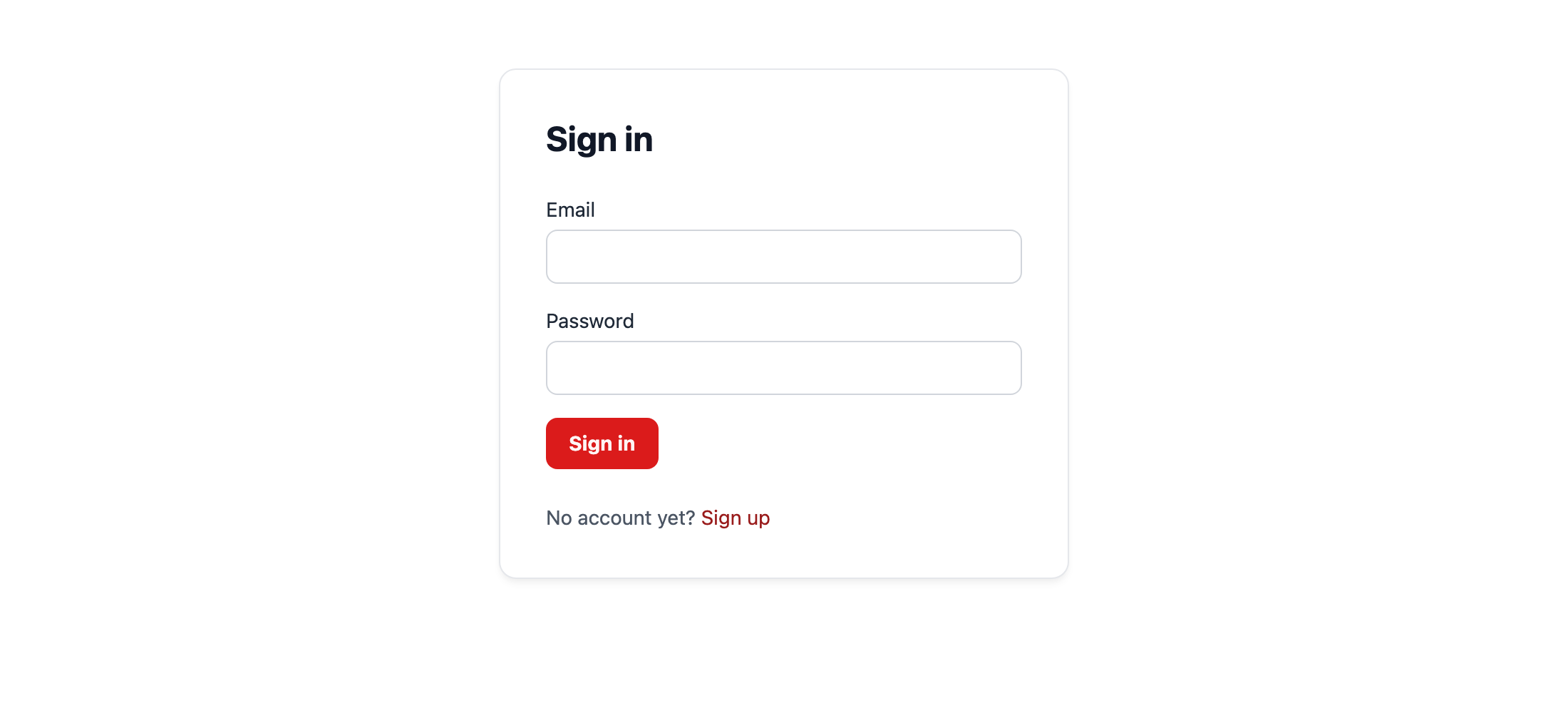
テストが通りました。チェックポイント: http://localhost:3333/register を開いてアカウントを作ると、サインインした状態でホームページに移動します。ただし、画面にはまだそれを示す表示がありません。
/login で間違ったパスワードを入力すると「Invalid credentials.」と表示されます。このとき、自分では組み立てていない仕組みが 2 つ動いています。セッション cookie と、フォームが送信した CSRF トークンで、どちらも auth: {} を指定しただけで有効になったものです。
bunx guren gategit add -A
git commit -m "feat: add registration, login, and logout"7. プロフィールページのテストを先に書く
サインインしたユーザーが見るページと、そこからログアウトする手段を用意します。仕様は次のとおりです。
tests/ProfileController.test.tsimport { beforeAll, beforeEach, describe, it } from 'bun:test'
import { TestApp } from '@guren/testing'
import app from '../src/app.js'
import { resetDatabase } from '../config/database.js'
import { User } from '../app/Models/User.js'

describe('ProfileController', () => {
  let http: TestApp

  beforeAll(async () => {
    http = await TestApp.fromApp(app)
  })

  beforeEach(async () => {
    await resetDatabase()
  })

  it('shows the signed-in user their name and email', async () => {
    const user = await User.create({ name: 'Ada', email: 'ada@example.com', password: 'correct horse battery' })

    const response = await http.actingAs(user).get('/profile').assertOk()
    await response.assertBodyContains('ada@example.com')
  })

  it('answers 401 to a guest', async () => {
    await http.get('/profile').assertUnauthorized()
  })
})
bun test2 つのテストが失敗します。2 つ目のテストは、ゲストが /profile を開いたら 401 を返す(リダイレクトはしない)という決定を固定するものです。第 6 章では保護する範囲全体をログインページへのリダイレクトに切り替えますが、ページが 1 枚だけならコントローラー自身で拒否できます。
8. エージェントに任せる
エージェントに次のプロンプトを送ります。
Add a `/profile` page named `profile` for the signed-in user. `ProfileController.show` gets the user with `this.auth.userOrFail()`, which answers 401 to a guest, and sends the name and email to `resources/js/pages/profile/Show.tsx` through a `UserResource` (id, name, email; never the password hash). The page shows both and has a "Log out" button that posts to `/logout` through an Inertia `Link` with `method="post"`. `tests/ProfileController.test.ts` describes it; make it pass.この章で紹介するハーネスの仕組みは guren context User です。第 1 章では、エージェントがセッションの開始時に受け取るプロジェクト全体の地図を見ました。特定のエンティティに手を付ける前には、全体の地図の代わりに、そのエンティティに絞ったバンドルを取得できます。
bunx guren context Userモデル、列、hidden の一覧、このモデルを使うアクションのルート、そのアクションが描画するページ、このモデルについて定めた docs が 1 画面にまとまって表示されます。
現時点で該当するルートは POST /register だけで、これは RegisterController.store が User.create() を呼んでいるためです。ログインとログアウトは this.auth を通してユーザーを扱い、User を直接参照しないので一覧には出てきません。ProfileController.show ができると、userOrFail<UserRecord>() を通じて /profile とそのページもバンドルに加わります。
雛形のルールには、エンティティに関わる作業の前にこのコマンドを実行するよう書かれているので、エージェントのトランスクリプトで探してみてください。バンドルを読んだエージェントは、リソースを書く前の時点で、passwordHash が hidden であることも User が AuthenticatableModel であることも把握しています。
手元にエージェントが無い場合は、 次の 4 ファイルを書きます。
app/Http/Resources/UserResource.tsimport { Resource } from '@guren/core'
import type { UserRecord } from '../../Models/User.js'

export interface UserResourceData extends Record<string, unknown> {
  id: number
  name: string
  email: string
}

export class UserResource extends Resource<UserRecord, UserResourceData> {
  toArray(): UserResourceData {
    return {
      id: this.resource.id,
      name: this.resource.name,
      email: this.resource.email,
    }
  }
}
app/Http/Controllers/ProfileController.tsimport { Controller } from '@guren/core'
import { pages } from '@/.guren/pages.gen'
import type { UserRecord } from '../../Models/User.js'
import { UserResource } from '../Resources/UserResource.js'

export default class ProfileController extends Controller {
  async show(): Promise<Response> {
    const user = await this.auth.userOrFail<UserRecord>()

    return this.inertia(pages.profile.Show, {
      user: new UserResource(user).toJSON(),
    })
  }
}
resources/js/pages/profile/Show.tsximport { Head, Link } from '@inertiajs/react'
import type { UserResourceData } from '@/app/Http/Resources/UserResource'

interface Props {
  user: UserResourceData
}

export default function ProfileShow({ user }: Props) {
  return (
    <>
      <Head title="Your profile" />
      <main className="min-h-screen bg-g-page font-sans text-g-text">
        <div className="mx-auto max-w-3xl space-y-6 px-6 py-12">
          <h1 className="text-3xl font-bold text-g-heading">{user.name}</h1>
          <p className="text-g-text-2">{user.email}</p>
          <Link
            href="/logout"
            method="post"
            as="button"
            className="rounded-g-ctl border border-g-line-strong px-3 py-1 text-sm text-g-text transition hover:border-g-muted"
          >
            Log out
          </Link>
        </div>
      </main>
    </>
  )
}
routes/web.tsimport { Router } from '@guren/core'
import HomeController from '../app/Http/Controllers/HomeController.js'
import AboutController from '../app/Http/Controllers/AboutController.js'
import ContactController from '../app/Http/Controllers/ContactController.js'
import PostController from '../app/Http/Controllers/PostController.js'
import RegisterController from '../app/Http/Controllers/Auth/RegisterController.js'
import LoginController from '../app/Http/Controllers/Auth/LoginController.js'
import ProfileController from '../app/Http/Controllers/ProfileController.js'
import { Post } from '../app/Models/Post.js'
import { PostPayloadSchema } from '../app/Http/Validators/PostValidator.js'
import { RegisterSchema } from '../app/Http/Validators/RegisterValidator.js'
import { LoginSchema } from '../app/Http/Validators/LoginValidator.js'

export function registerWebRoutes(router: Router): void {
  router.get('/', [HomeController, 'index'])
  router.get('/about', [AboutController, 'index']).name('about')
  router.get('/contact', [ContactController, 'index']).name('contact')

  router.get('/register', [RegisterController, 'show']).name('register')
  router.post('/register', { name: 'register.store', body: RegisterSchema }, [RegisterController, 'store'])
  router.get('/login', [LoginController, 'show']).name('login')
  router.post('/login', { name: 'login.store', body: LoginSchema }, [LoginController, 'store'])
  router.post('/logout', [LoginController, 'destroy']).name('logout')
  router.get('/profile', [ProfileController, 'show']).name('profile')

  router.group('/posts', (posts) => {
    posts.get('/', [PostController, 'index']).name('posts.index')
    posts.get('/create', [PostController, 'create']).name('posts.create')
    posts.get('/:id', { bind: { id: Post }, name: 'posts.show' }, [PostController, 'show'])
    posts.get('/:id/edit', { bind: { id: Post }, name: 'posts.edit' }, [PostController, 'edit'])
    posts.post('/', { name: 'posts.store', body: PostPayloadSchema }, [PostController, 'store'])
    posts.put('/:id', { bind: { id: Post }, name: 'posts.update', body: PostPayloadSchema }, [PostController, 'update'])
    posts.delete('/:id', { bind: { id: Post }, name: 'posts.destroy' }, [PostController, 'destroy'])
  })

  // Health check endpoint for load balancers and uptime monitors
  router.get('/health', (c) => c.json({ status: 'ok' }))
}
bun run codegenbun test確認項目は次のとおりです。
- コントローラーが
this.auth.userOrFail()を使っている(this.auth.user()と手動の null チェックではない)。guren auditは前者を認証チェックとして認識するが、後者は認識しない。 - ページが
UserResourceを受け取り、そのリソースにpasswordHashが含まれていない。ハッシュはすでに 2 つの層で隠されているので、ここで確かめるのは、エージェントがそれらの層を迂回していないかどうか。 - 「Log out」は
POSTで、CSRF トークンが一緒に送られるよう Inertia のLinkから送信している。素の<form method="post">では 403 で拒否される。 - 2 つのテストが通り、それ以前のテストもすべて通ったままになっている。
チェックポイント: サインインした状態で http://localhost:3333/profile を開き、ログアウトします。そのあと /profile を再読み込みすると 401 になります。
bunx guren gatebunx guren auditaudit の警告は以前より減っています。POST /register、/login、/logout はゲスト向けのフローとして認識され、認証を求められません。投稿ルートの警告 3 件はまだ残っていますが、これは第 6 章で解消します。
git add -A
git commit -m "feat: add the profile page"
ここまでの状態
usersテーブルにハッシュの列と一意なメールアドレスの列があり、テーブルを作り直す形でマイグレーションしました。- 作成時にパスワードをハッシュ化し、外に出すときはハッシュを隠すモデルがあります。
- インメモリストアのセッションと、すべての変更系リクエストに対する CSRF 保護が有効で、テストでも CSRF トークンを用意できるようになっています。
- 登録・ログイン・ログアウトを手で組み立て、最も重要な性質をテストで固定しました。
- プロフィールページは読者が先にテストを書き、エージェントが実装しました。
よくあるつまずき
auth: {}を足したらすべてのフォームのテストが 403 で失敗する。 第 4 節で説明したとおり、変更系のリクエストには CSRF トークンが必要になりました。withCsrf()でトークンを用意し、返されたクライアントからリクエストを送ってください。withCsrf()が「did not set an XSRF-TOKEN cookie」で例外を投げる。createAppにauthが指定されていないか、トークンの用意に使う GET のパスにアプリが応答していません。ページを返すパスを渡してください。- 同じメールアドレスで 2 回登録すると 500 になる。 一意制約は働いていますが、その手前で重複を確かめる処理がありません。第 6 章でそのチェックを追加します。それまではデータベースのエラーになりますが、同じメールアドレスのアカウントが 2 つできるよりはましです。
this.authが「requires the auth middleware」で例外を投げる。providersにAuthProviderが無いか、auth: {}が抜けています。セッションをマウントするのがauth: {}、モデルを指定するのがAuthProviderなので、両方とも必要です。- サインインしていたのに、いつのまにかログアウトしている。
bun run devはサーバーをbun --hotで動かしており、auth: {}で有効になるセッションはメモリ上にあるので、ホットリロードのたびに消えます。サインインし直してください。第 14 章でセッションをデータベースに移すまでは、これが通常の動作です。 - ログインのテストで
actingAs()が常に成功する。actingAs()はattempt()を含む認証コンテキスト全体をスタブに置き換えます。ユーザーとして操作するためのものなので、サインイン自体のテストには使わないでください。
演習
- パスワードのハッシュ化は、わざと遅くしてあります。かかる時間を計ってみてください。
import { Hash } from '@guren/core'

const started = performance.now()
await new Hash().hash('correct horse battery')
console.log(performance.now() - started, 'ms')
そのうえで、1 回の試行にこれだけ時間がかかるにもかかわらず、第 14 章で追加するレート制限がログインのルートに必要な理由を説明してください。
actingAs()はログインの処理を飛ばすので、その処理自体はテストできません。/loginに間違ったパスワードを送り、訪問者に表示されるメッセージを検証するテストを書いてください。そのメッセージはどこから来ているでしょうか。また、パスワードの間違いと未登録のメールアドレスで同じ文言になっているのはなぜでしょうか。
演習 1: ヒントと答えの例
コードをアプリのルートにファイルとして保存し(たとえば hash-time.ts)、bun hash-time.ts で実行してください。終わったらファイルは消します。bun test の中では実行しないでください。テストの実行中は、テストを速く保つためにハッシュ化のコストがずっと低い設定に切り替わるので、測った数字に意味がなくなります。
ハッシュが遅くても、抑えられるのは 1 回の試行の速さで、届く試行の数ではありません。攻撃者は多数の接続から並行して試行を送れます。試行のたびにサーバーはハッシュ化にその時間を使うので、間違ったパスワードを大量に送られると、送る側よりサーバーのほうがずっと大きな負担を負います。
第 14 章のレート制限は、1 つのクライアントが一定時間内に /login へ送れる試行の数に上限を設けます。これはハッシュ化にはできないことです。
演習 2: ヒントと答えの例
第 5 節の tests/LoginController.test.ts には、すでに「rejects the wrong password with a message」があります。これを読んでから、登録されていないメールアドレス用の対になるテストを書いてください。
it('rejects an unknown email with the same message', async () => {
  const csrf = await http.withCsrf('/login')
  await csrf
    .post('/login', { email: 'nobody@example.com', password: 'correct horse battery' })
    .assertStatus(422)
    .assertJsonPath('errors.message.0', 'Invalid credentials.')
})
メッセージは LoginController.store から来ています。this.auth.attempt() が false を返すと、アクションは ValidationException.withMessages({ message: 'Invalid credentials.' }) を投げ、ログインページはそれを errors.message から表示します。
attempt() はどちらの場合も false を返すだけで、どちらだったかは伝えません。アクションの側も尋ねません。メッセージを 2 種類に分けると、メールアドレスの一覧を持つ人に、どのアドレスがこのブログにアカウントを持っているかを教えることになります。
次へ
第 6 章: ルートを保護する では、requireAuthenticated を使って投稿の変更をサインインしたユーザーだけに許し、既存のデータを残したままマイグレーションしてすべての投稿に著者を設定します。最後に、自分で組み立てたものと bunx guren add auth が生成するものを比べます。