
第 10 章: ファイル
ブログには画像が欲しくなります。この章では Guren の attachments レイヤーを導入し、すべての投稿にカバー画像を付けます。画像は公開ディレクトリの外に保存し、署名付き URL で配信します。そのあとギャラリーの実装をエージェントに任せます。途中で guren check の検査項目がいくつか増え、「プライベート」を「公開」にしてしまう間違いをそのチェックが捕まえるところも確認します。
第 10 章: ファイル
ブログには画像が欲しくなります。この章では Guren の attachments レイヤーを導入し、すべての投稿にカバー画像を付けます。画像は公開ディレクトリの外に保存し、署名付き URL で配信します。そのあとギャラリーの実装をエージェントに任せます。途中で guren check の検査項目がいくつか増え、「プライベート」を「公開」にしてしまう間違いをそのチェックが捕まえるところも確認します。
この章で学ぶこと:
- サーバーから見たアップロードの実体: multipart ボディの中の
File、attachmentsテーブルの 1 行、ディスク上のオブジェクト - アップロードを
public/の下に置かない理由と、代わりに使う署名付き配信ルートの役割 - モデルでの attachments の宣言方法と、それを扱う 4 つの呼び出し:
attach、withAttachments、detach、purgeAttachments - フォームからファイルを送る方法と、テストから送る方法
guren checkが検査する attachment のルールと、そのうち 1 つだけが警告でなく失敗になる理由
開発サーバーが動いていなければ起動します。
bun run dev1. attachments レイヤー
コマンド 1 つで導入できます。
bunx guren add attachmentsここで入ったコードは今後アプリの一部として保守していくので、何が変わったかを確認しておきます。まずストレージレイヤーが入りました。config: [...] に登録された config/storage.ts と app/Services/FileStorage.ts で、ディスクは ./storage/app を保存先とする local と、./public/storage を保存先とする public の 2 つです。
続いて db/schema.ts に attachments テーブルを追加し、config/attachments.ts と app/Providers/AttachmentsProvider.ts を作成して、プロバイダーを src/app.ts に登録しました。さらに、ルート registrar の先頭に registerAttachmentRoutes の呼び出しを入れて配信ルートをマウントし、attachments:prune コンソールコマンドも登録しています。
テーブルにはマイグレーションが必要です。
bun run db:make create_attachmentsbun run db:migrate手で加える変更が 2 つあります。1 つ目は .gitignore です。ディスクにはコミットしてはいけないファイルが入るので、そのディレクトリを追加します。
printf 'storage/app/\npublic/storage/\n' >> .gitignore2 つ目は、config にモデルのマップを足すことです。どのモデルが attachments を持つかはジェネレーターには分からないので、この部分は自動では書かれません。prune コマンドはこのマップを使って、attachment の持ち主がまだ存在するかを確かめます。
下のブロックでは、末尾に Model.morphMap を足し、そのために必要な Model と Post の import を加えています。ジェネレーターが書いた長めのコメントは、この節で説明する 3 つの判断に絞りました。
config/attachments.tsimport { Model, configureAttachments } from '@guren/core'
import { attachments } from '../db/schema'
import { Post } from '../app/Models/Post.js'

/**
 * Wires the attachments layer once at boot (AttachmentsProvider imports this
 * module). `Attachment` is the app-local model over the attachments table.
 */
export const { Attachment, engine: attachmentEngine } = configureAttachments({
  table: attachments,
  storage: (container) => container.make('storage'),
  // Uploads are bytes a stranger chose, so they live on a disk rooted outside
  // public/ and are handed out only through the signed delivery route that
  // registerAttachmentRoutes(router) mounts. Rooting this disk inside public/
  // bypasses all of it; `guren check` fails that shape.
  disk: 'local',
  // 'public' disks build URLs with disk.url(); 'private' ones go through the
  // delivery route below. Undeclared disks count as public.
  disks: { local: 'private', public: 'public' },
  // Presence is the switch: private-disk URLs become signed delivery-route URLs.
  delivery: {},
})

// attachments:prune resolves attachableType through this map to check the owning
// record still exists, so every model declaring attachments belongs here.
Model.morphMap = { Post }
このファイルには 3 つの判断が入っていて、この章のセキュリティ上の要点はすべてここにあります。
disk: 'local'の保存先は./storage/appです。このディレクトリを配信する仕組みはありません。public/の下のファイルはパスを推測できれば誰でも取得できますが、ここに置いたファイルは、渡すと判断したコードを通さない限り取得できません。disks: { local: 'private' }と宣言したので、localのファイルの URL は配信ルートへの署名付きリンクになり、期限も付きます。ファイルのパスがそのまま URL になることはありません。delivery: {}を書くと、その配信ルートが有効になります。配信ルートはオブジェクトをストリーミングで返し、ブラウザがアップロードを画像かダウンロードとしてしか扱わないようにヘッダーを付けます。インライン表示を許す型の許可リスト、nosniff、サンドボックス化した CSP です。第 14 章ではこのルートがオブジェクトストレージへのリダイレクトに変わりますが、ページが使う URL は変わりません。
ルートファイルの先頭には、配信ルートを登録する呼び出しが入りました。呼び出しの位置を確認し、今後もそこに残しておけるように、ファイル全体を次の内容に置き換えます。
routes/web.tsimport { Router, registerAttachmentRoutes, requireAuthenticated, requireGuest } from '@guren/core'
import HomeController from '../app/Http/Controllers/HomeController.js'
import AboutController from '../app/Http/Controllers/AboutController.js'
import ContactController from '../app/Http/Controllers/ContactController.js'
import PostController from '../app/Http/Controllers/PostController.js'
import CommentController from '../app/Http/Controllers/CommentController.js'
import LinkController from '../app/Http/Controllers/LinkController.js'
import RegisterController from '../app/Http/Controllers/Auth/RegisterController.js'
import LoginController from '../app/Http/Controllers/Auth/LoginController.js'
import ProfileController from '../app/Http/Controllers/ProfileController.js'
import { Post } from '../app/Models/Post.js'
import { Comment } from '../app/Models/Comment.js'
import { Link } from '../app/Models/Link.js'
import { PostIdParamSchema, PostPayloadSchema } from '../app/Http/Validators/PostValidator.js'
import { CommentPayloadSchema } from '../app/Http/Validators/CommentValidator.js'
import { LinkPayloadSchema } from '../app/Http/Validators/LinkValidator.js'
import { RegisterSchema } from '../app/Http/Validators/RegisterValidator.js'
import { LoginSchema } from '../app/Http/Validators/LoginValidator.js'

export function registerWebRoutes(baseRouter: Router): void {
  // The signed delivery route for private attachments (config/attachments.ts).
  registerAttachmentRoutes(baseRouter)

  // aliasMiddleware() returns a Router carrying the alias name in its type;
  // capture it, or `.middleware('auth')` below will not compile.
  const router = baseRouter
    .aliasMiddleware('auth', requireAuthenticated({ redirectTo: '/login' }))
    .aliasMiddleware('guest', requireGuest({ redirectTo: '/' }))

  router.get('/', [HomeController, 'index'])
  router.get('/about', [AboutController, 'index']).name('about')
  router.get('/contact', [ContactController, 'index']).name('contact')

  router.middleware('guest').group((guest) => {
    guest.get('/register', [RegisterController, 'show']).name('register')
    guest.post('/register', { name: 'register.store', body: RegisterSchema }, [RegisterController, 'store'])
    guest.get('/login', [LoginController, 'show']).name('login')
    guest.post('/login', { name: 'login.store', body: LoginSchema }, [LoginController, 'store'])
  })

  router.middleware('auth').group((auth) => {
    auth.post('/logout', [LoginController, 'destroy']).name('logout')
    auth.get('/profile', [ProfileController, 'show']).name('profile')
    auth.get('/posts/create', [PostController, 'create']).name('posts.create')
    auth.get('/posts/:id/edit', { bind: { id: Post }, name: 'posts.edit' }, [PostController, 'edit'])
    auth.post('/posts', { name: 'posts.store', body: PostPayloadSchema }, [PostController, 'store'])
    auth.put('/posts/:id', { bind: { id: Post }, name: 'posts.update', body: PostPayloadSchema }, [PostController, 'update'])
    auth.delete('/posts/:id', { bind: { id: Post }, name: 'posts.destroy' }, [PostController, 'destroy'])
    auth.post('/posts/:id/publish', { bind: { id: Post }, name: 'posts.publish' }, [PostController, 'publish'])
    auth.post('/posts/:id/unpublish', { bind: { id: Post }, name: 'posts.unpublish' }, [PostController, 'unpublish'])
    auth.post('/posts/:id/comments', { bind: { id: Post }, name: 'comments.store', body: CommentPayloadSchema }, [CommentController, 'store'])
    auth.delete('/comments/:id', { bind: { id: Comment }, name: 'comments.destroy' }, [CommentController, 'destroy'])
    auth.get('/links/create', [LinkController, 'create']).name('links.create')
    auth.get('/links/:id/edit', { bind: { id: Link }, name: 'links.edit' }, [LinkController, 'edit'])
    auth.post('/links', { name: 'links.store', body: LinkPayloadSchema }, [LinkController, 'store'])
    auth.put('/links/:id', { bind: { id: Link }, name: 'links.update', body: LinkPayloadSchema }, [LinkController, 'update'])
    auth.delete('/links/:id', { bind: { id: Link }, name: 'links.destroy' }, [LinkController, 'destroy'])
  })

  router.get('/posts', [PostController, 'index']).name('posts.index')
  router.get('/posts/:id', { name: 'posts.show', params: PostIdParamSchema }, [PostController, 'show'])
  router.get('/links', [LinkController, 'index']).name('links.index')
  router.get('/links/:id', { bind: { id: Link }, name: 'links.show' }, [LinkController, 'show'])

  // Health check endpoint for load balancers and uptime monitors
  router.get('/health', (c) => c.json({ status: 'ok' }))
}
config/attachments.ts は Post を import していますが、Post はまだ attachment を 1 つも宣言していません。次はこの宣言に取りかかります。
2. カバー画像のテストを先に書く
テストには画像が要ります。1 ピクセルの PNG で十分で、これならテストファイルに直接埋め込めるほど小さく済みます。
tests/PostAttachments.test.tsimport { beforeAll, beforeEach, describe, expect, it } from 'bun:test'
import { TestApp } from '@guren/testing'
import app from '../src/app.js'
import { resetDatabase } from '../config/database.js'
import { Post } from '../app/Models/Post.js'
import { User, type UserRecord } from '../app/Models/User.js'

const PNG = Uint8Array.from(
  atob('iVBORw0KGgoAAAANSUhEUgAAAAEAAAABCAYAAAAfFcSJAAAADUlEQVR42mNkYPhfDwAChwGA60e6kgAAAABJRU5ErkJggg=='),
  (char) => char.charCodeAt(0),
)

function image(name: string): File {
  return new File([PNG], name, { type: 'image/png' })
}

function disk() {
  return app.container.make('storage').disk('local')
}

describe('post attachments', () => {
  let http: TestApp
  let ada: UserRecord
  let asAda: TestApp

  beforeAll(async () => {
    http = await TestApp.fromApp(app)
  })

  beforeEach(async () => {
    await resetDatabase()
    ada = await User.create({ name: 'Ada', email: 'ada@example.com', password: 'correct horse battery' })
    asAda = await http.actingAs(ada).withCsrf()
  })

  it('stores a cover with a post and serves it through a signed URL', async () => {
    const form = new FormData()
    form.append('title', 'With a cover')
    form.append('body', 'Look at this')
    form.append('tags', '')
    form.append('cover', image('cover.png'))

    await asAda.post('/posts', form).assertRedirect()

    const post = await Post.where('title', 'With a cover').first()
    const [loaded] = await Post.withAttachments([post!], ['cover'])
    expect(loaded!.cover?.contentType).toBe('image/png')
    expect(loaded!.cover?.url).toContain('/attachments/')
    expect(loaded!.cover?.url).toContain('signature=')

    const response = await http.get(`/posts/${post!.id}`).assertOk()
    await response.assertBodyContains('/attachments/')
  })

  it('replaces the cover, and lets only the author do it', async () => {
    const grace = await User.create({ name: 'Grace', email: 'grace@example.com', password: 'correct horse battery' })
    const asGrace = await http.actingAs(grace).withCsrf()
    const post = await Post.forceCreate({ title: 'Recover', body: 'Body', authorId: ada.id })
    await Post.attach(post.id, 'cover', image('first.png'))

    const attempt = new FormData()
    attempt.append('cover', image('second.png'))
    await asGrace.post(`/posts/${post.id}/cover`, attempt).assertForbidden()

    const replacement = new FormData()
    replacement.append('cover', image('second.png'))
    await asAda.post(`/posts/${post.id}/cover`, replacement).assertRedirect(`/posts/${post.id}`)

    const [loaded] = await Post.withAttachments([post], ['cover'])
    expect(loaded!.cover?.name).toBe('second.png')
  })

  it('removes the files when the post is deleted', async () => {
    const post = await Post.forceCreate({ title: 'Doomed', body: 'Body', authorId: ada.id })
    const attachment = await Post.attach(post.id, 'cover', image('cover.png'))
    expect(await disk().exists(attachment.path)).toBe(true)

    await asAda.delete(`/posts/${post.id}`).assertRedirect('/posts')

    expect(await disk().exists(attachment.path)).toBe(false)
  })
})
このファイルで注目したい点は 3 つあります。1 つ目は、アップロードが File を含む FormData になっていることです。TestApp は File を見つけると multipart で送ります。JSON のボディではファイルを運べません。
2 つ目に、URL については署名されていることまでアサートしています。署名の無い URL が返るなら、ディスクが公開されていることになるからです。
3 つ目に、最後のテストは attachment の行に記録されたオブジェクトキーを使って、ディスクそのものを調べています。投稿を削除したらファイルも残してはいけませんが、これはデータベースへのアサーションでは確かめられません。
テストは NODE_ENV=test で実行され、雛形で作られた config/storage.ts はこのとき local ディスクの保存先を ./storage/app/testing にします。disk() がパスを自分で組み立てずにディスクへ問い合わせているのはこのためで、テストでアップロードしたファイルが、開発用データベースの参照するファイルと混ざることもありません。
bun test3 件とも失敗します。1 件は Post.withAttachments is not a function、残りの 2 件は Post.attach is not a function です。Post がまだ attachable になっていないためです。
3. カバー画像を手で書く
モデルは、クラスを包む形でコレクションを宣言します。image: 'require' を指定すると、画像でないファイルは、名前や type ヘッダーが何を名乗っていても、attach の時点でバリデーションメッセージ付きで拒否されます。
app/Models/Post.tsimport { Attachable, defineModel, hasOneAttached, type BelongsToRecord, type BelongsToManyRecord, type HasManyRecord } from '@guren/core'
import { posts, postTags } from '../../db/schema.js'
import type { UserRecord } from './User.js'
import type { CommentRecord } from './Comment.js'
import type { TagRecord } from './Tag.js'

export type PostRecord = typeof posts.$inferSelect
export type NewPostRecord = typeof posts.$inferInsert

export class Post extends Attachable(defineModel(posts, { fillable: ['title', 'body'] }), {
  cover: hasOneAttached({ image: 'require' }),
}) {
  static override relationTypes: {
    author: BelongsToRecord<UserRecord>
    comments: HasManyRecord<CommentRecord>
    tags: BelongsToManyRecord<TagRecord>
  } = { author: null, comments: [], tags: [] }
}

Post.belongsTo('author', () => import('./User.js').then((m) => m.User), 'authorId', 'id')
Post.hasMany('comments', () => import('./Comment.js').then((m) => m.Comment), 'postId', 'id')
Post.belongsToMany('tags', () => import('./Tag.js').then((m) => m.Tag), postTags, 'postId', 'tagId')
Attachable は Post に 4 つの static メソッドを加えます。attach(id, collection, file)、detach(id, collection, attachmentId?)、withAttachments(records, names)、purgeAttachments(id) です。テーブルやディスクはここには出てきません。どちらも config で一度決めてあります。
リソースはカバー画像を AttachmentData として渡します。中身は id、名前、コンテンツタイプ、サイズ、寸法と、ページで使う URL です。その URL が署名付きのルートになるか CDN のパスになるかは config が決めることで、リソースは関知しません。
app/Http/Resources/PostResource.tsimport { Resource, type AttachmentData } from '@guren/core'
import type { PostRecord } from '../../Models/Post.js'
import type { UserRecord } from '../../Models/User.js'
import type { TagRecord } from '../../Models/Tag.js'

export type PostWithRelations = PostRecord & {
  author?: UserRecord | null
  tags?: TagRecord[]
  cover?: AttachmentData | null
}

export interface PostResourceData extends Record<string, unknown> {
  id: number
  title: string
  body: string
  createdAt: string
  publishedAt: string | null
  author: { id: number; name: string } | null
  tags: string[]
  cover: AttachmentData | null
}

export class PostResource extends Resource<PostWithRelations, PostResourceData> {
  toArray(): PostResourceData {
    const author = this.resource.author
    return {
      id: this.resource.id,
      title: this.resource.title,
      body: this.resource.body,
      createdAt: this.resource.createdAt,
      publishedAt: this.resource.publishedAt,
      author: author ? { id: author.id, name: author.name } : null,
      tags: (this.resource.tags ?? []).map((tag) => tag.name),
      cover: this.resource.cover ?? null,
    }
  }
}
次はコントローラーです。store はカバー画像が送られてきたら attach し、show はそれを読み込みます。destroy は行を消す前にファイルを purge し、新しく加える cover アクションはカバー画像を差し替えます。this.file('cover') は multipart のフィールドを読み、フィールドが無いか空なら null を返します。
app/Http/Controllers/PostController.tsimport { Controller, ValidationException, paginate, type PaginatedPageProps } from '@guren/core'
import { pages } from '@/.guren/pages.gen'
import { Post } from '../../Models/Post.js'
import { Comment } from '../../Models/Comment.js'
import { Tag } from '../../Models/Tag.js'
import { PostTag } from '../../Models/PostTag.js'
import type { UserRecord } from '../../Models/User.js'
import { PostResource, type PostResourceData } from '../Resources/PostResource.js'
import { CommentResource } from '../Resources/CommentResource.js'
import { ListPostsQuerySchema, PostIdParamSchema, PostPayloadSchema } from '../Validators/PostValidator.js'

type PostsIndexProps = PaginatedPageProps<PostResourceData>

async function syncTags(postId: number, names: string[]): Promise<void> {
  await PostTag.delete({ postId })
  for (const name of names) {
    const tag = (await Tag.first({ name })) ?? (await Tag.create({ name }))
    await PostTag.forceCreate({ postId, tagId: tag.id })
  }
}

export default class PostController extends Controller {
  async index(): Promise<Response> {
    const { page } = this.validateQuery(ListPostsQuerySchema)
    const result = await Post.withPaginate('author', { page, perPage: 10, orderBy: ['id', 'desc'] })
    const paginator = paginate(result, { path: this.request.path ?? '/posts' })

    return this.inertia(pages.posts.Index, {
      data: result.data.map((post) => new PostResource(post).toJSON()),
      pagination: {
        meta: paginator.meta(),
        links: paginator.links(),
      },
    } satisfies PostsIndexProps)
  }

  async show(): Promise<Response> {
    const { id } = this.validateParams(PostIdParamSchema)
    const post = await Post.findWithOrFail(id, ['author', 'tags'])
    const [withCover] = await Post.withAttachments([post], ['cover'])
    const comments = await Comment.where('postId', post.id).with('author').orderBy('id', 'asc').get()

    return this.inertia(pages.posts.Show, {
      post: new PostResource(withCover!).toJSON(),
      canManage: await this.can('update', [Post, post]),
      comments: await Promise.all(
        comments.map(async (comment) => ({
          ...new CommentResource(comment).toJSON(),
          canDelete: await this.can('delete', [Comment, comment]),
        })),
      ),
    })
  }

  async create(): Promise<Response> {
    return this.inertia(pages.posts.New, {})
  }

  async store(): Promise<Response> {
    const author = await this.auth.userOrFail<UserRecord>()
    const { tags, ...data } = await this.validateBody(PostPayloadSchema)
    const post = await Post.create(data, { set: { authorId: author.id } })
    await syncTags(post.id, tags)
    const cover = await this.file('cover')
    if (cover) {
      await Post.attach(post.id, 'cover', cover)
    }
    return this.redirect(`/posts/${post.id}`)
  }

  async edit(): Promise<Response> {
    const post = this.model(Post)
    await this.authorize('update', [Post, post])
    const withTags = await Post.findWithOrFail(post.id, 'tags')

    return this.inertia(pages.posts.Edit, {
      post: new PostResource(withTags).toJSON(),
    })
  }

  async update(): Promise<Response> {
    const post = this.model(Post)
    await this.authorize('update', [Post, post])
    const { tags, ...data } = await this.validateBody(PostPayloadSchema)
    await Post.update({ id: post.id }, data)
    await syncTags(post.id, tags)
    return this.redirect(`/posts/${post.id}`)
  }

  async cover(): Promise<Response> {
    const post = this.model(Post)
    await this.authorize('update', [Post, post])
    const cover = await this.file('cover')
    if (!cover) {
      throw new ValidationException({ cover: ['Choose an image.'] })
    }
    await Post.attach(post.id, 'cover', cover)
    return this.redirect(`/posts/${post.id}`)
  }

  async destroy(): Promise<Response> {
    const post = this.model(Post)
    await this.authorize('delete', [Post, post])
    await Post.purgeAttachments(post.id)
    await Post.delete({ id: post.id })
    return this.redirect('/posts')
  }

  async publish(): Promise<Response> {
    const post = this.model(Post)
    await this.authorize('publish', [Post, post])
    await Post.forceUpdate({ id: post.id }, { publishedAt: new Date().toISOString() })
    return this.redirect(`/posts/${post.id}`)
  }

  async unpublish(): Promise<Response> {
    const post = this.model(Post)
    await this.authorize('publish', [Post, post])
    await Post.forceUpdate({ id: post.id }, { publishedAt: null })
    return this.redirect(`/posts/${post.id}`)
  }
}
この章の要になる細部が 2 つあります。1 つは、hasOneAttached のコレクションに Post.attach(post.id, 'cover', cover) を呼ぶと差し替えになることです。古いファイルは削除されて新しいファイルが保存され、行は 1 件のままです。
もう 1 つは、purgeAttachments を delete より先に呼ぶことです。attachments テーブルはポリモーフィックで、すべてのモデルが 1 つのテーブルを共有するため、posts への外部キーを持ちません。そのため削除は連鎖(cascade)せず、purge せずに投稿を削除すると、ディスクには持ち主のいないファイルが、テーブルには持ち主のいない行が残ります。attachments:prune はそうした残り物をあとから見つけるためのコマンドで、3 つ目のテストはそもそもこの状態を許しません。
カバー画像を差し替えるルートは update に含めず、独立した POST にしています。Inertia のフォームからファイルを PUT で送るにはメソッドの偽装(method spoofing)が必要ですが、Guren はそれを行いません。ルートを分けたほうが単純で、読みやすくもなります。
routes/web.tsimport { Router, registerAttachmentRoutes, requireAuthenticated, requireGuest } from '@guren/core'
import HomeController from '../app/Http/Controllers/HomeController.js'
import AboutController from '../app/Http/Controllers/AboutController.js'
import ContactController from '../app/Http/Controllers/ContactController.js'
import PostController from '../app/Http/Controllers/PostController.js'
import CommentController from '../app/Http/Controllers/CommentController.js'
import LinkController from '../app/Http/Controllers/LinkController.js'
import RegisterController from '../app/Http/Controllers/Auth/RegisterController.js'
import LoginController from '../app/Http/Controllers/Auth/LoginController.js'
import ProfileController from '../app/Http/Controllers/ProfileController.js'
import { Post } from '../app/Models/Post.js'
import { Comment } from '../app/Models/Comment.js'
import { Link } from '../app/Models/Link.js'
import { PostIdParamSchema, PostPayloadSchema } from '../app/Http/Validators/PostValidator.js'
import { CommentPayloadSchema } from '../app/Http/Validators/CommentValidator.js'
import { LinkPayloadSchema } from '../app/Http/Validators/LinkValidator.js'
import { RegisterSchema } from '../app/Http/Validators/RegisterValidator.js'
import { LoginSchema } from '../app/Http/Validators/LoginValidator.js'

export function registerWebRoutes(baseRouter: Router): void {
  // The signed delivery route for private attachments (config/attachments.ts).
  registerAttachmentRoutes(baseRouter)

  // aliasMiddleware() returns a Router carrying the alias name in its type;
  // capture it, or `.middleware('auth')` below will not compile.
  const router = baseRouter
    .aliasMiddleware('auth', requireAuthenticated({ redirectTo: '/login' }))
    .aliasMiddleware('guest', requireGuest({ redirectTo: '/' }))

  router.get('/', [HomeController, 'index'])
  router.get('/about', [AboutController, 'index']).name('about')
  router.get('/contact', [ContactController, 'index']).name('contact')

  router.middleware('guest').group((guest) => {
    guest.get('/register', [RegisterController, 'show']).name('register')
    guest.post('/register', { name: 'register.store', body: RegisterSchema }, [RegisterController, 'store'])
    guest.get('/login', [LoginController, 'show']).name('login')
    guest.post('/login', { name: 'login.store', body: LoginSchema }, [LoginController, 'store'])
  })

  router.middleware('auth').group((auth) => {
    auth.post('/logout', [LoginController, 'destroy']).name('logout')
    auth.get('/profile', [ProfileController, 'show']).name('profile')
    auth.get('/posts/create', [PostController, 'create']).name('posts.create')
    auth.get('/posts/:id/edit', { bind: { id: Post }, name: 'posts.edit' }, [PostController, 'edit'])
    auth.post('/posts', { name: 'posts.store', body: PostPayloadSchema }, [PostController, 'store'])
    auth.put('/posts/:id', { bind: { id: Post }, name: 'posts.update', body: PostPayloadSchema }, [PostController, 'update'])
    auth.delete('/posts/:id', { bind: { id: Post }, name: 'posts.destroy' }, [PostController, 'destroy'])
    auth.post('/posts/:id/publish', { bind: { id: Post }, name: 'posts.publish' }, [PostController, 'publish'])
    auth.post('/posts/:id/unpublish', { bind: { id: Post }, name: 'posts.unpublish' }, [PostController, 'unpublish'])
    auth.post('/posts/:id/cover', { bind: { id: Post }, name: 'posts.cover' }, [PostController, 'cover'])
    auth.post('/posts/:id/comments', { bind: { id: Post }, name: 'comments.store', body: CommentPayloadSchema }, [CommentController, 'store'])
    auth.delete('/comments/:id', { bind: { id: Comment }, name: 'comments.destroy' }, [CommentController, 'destroy'])
    auth.get('/links/create', [LinkController, 'create']).name('links.create')
    auth.get('/links/:id/edit', { bind: { id: Link }, name: 'links.edit' }, [LinkController, 'edit'])
    auth.post('/links', { name: 'links.store', body: LinkPayloadSchema }, [LinkController, 'store'])
    auth.put('/links/:id', { bind: { id: Link }, name: 'links.update', body: LinkPayloadSchema }, [LinkController, 'update'])
    auth.delete('/links/:id', { bind: { id: Link }, name: 'links.destroy' }, [LinkController, 'destroy'])
  })

  router.get('/posts', [PostController, 'index']).name('posts.index')
  router.get('/posts/:id', { name: 'posts.show', params: PostIdParamSchema }, [PostController, 'show'])
  router.get('/links', [LinkController, 'index']).name('links.index')
  router.get('/links/:id', { bind: { id: Link }, name: 'links.show' }, [LinkController, 'show'])

  // Health check endpoint for load balancers and uptime monitors
  router.get('/health', (c) => c.json({ status: 'ok' }))
}
続いてフォームです。Inertia の useForm は、データに File が入った時点で自動的に multipart のリクエストに切り替わります。追加するのは input 1 つと、フォームの型のフィールド 1 つだけです。このフィールドはバリデーターが知らないので、ルートの契約にも出てきません。
resources/js/pages/posts/New.tsximport { Head, useForm } from '@inertiajs/react'
import type { ApiRoutes } from '@/.guren/api-client.gen'
import type { RouteBody } from '@guren/inertia-client/typed-forms'
import { route } from '@/.guren/routes.gen'

// Inertia switches the request to FormData as soon as the data holds a File.
type PostForm = RouteBody<ApiRoutes, 'posts.store'> & { cover: File | null }

const inputClass =
  'w-full rounded-g-ctl border border-g-line-strong bg-g-panel px-3 py-2 text-g-text transition outline-none placeholder:text-g-muted focus:border-transparent focus:outline-2 focus:-outline-offset-1 focus:outline-g-accent'

export default function NewPost() {
  const form = useForm<PostForm>({ title: '', body: '', tags: '', cover: null })

  return (
    <>
      <Head title="New post" />
      <main className="min-h-screen bg-g-page font-sans text-g-text">
        <div className="mx-auto max-w-3xl space-y-6 px-6 py-12">
          <h1 className="text-3xl font-bold text-g-heading">New post</h1>
          <form
            className="space-y-4"
            onSubmit={(event) => {
              event.preventDefault()
              form.post(route('posts.store'))
            }}
          >
            <div>
              <input value={form.data.title} onChange={(event) => form.setData('title', event.target.value)} placeholder="Title" className={inputClass} />
              {form.errors.title && <p className="mt-1 text-sm text-g-danger">{form.errors.title}</p>}
            </div>
            <div>
              <textarea value={form.data.body} onChange={(event) => form.setData('body', event.target.value)} placeholder="Body" rows={8} className={inputClass} />
              {form.errors.body && <p className="mt-1 text-sm text-g-danger">{form.errors.body}</p>}
            </div>
            <div>
              <input value={form.data.tags} onChange={(event) => form.setData('tags', event.target.value)} placeholder="Tags, comma-separated" className={inputClass} />
              {form.errors.tags && <p className="mt-1 text-sm text-g-danger">{form.errors.tags}</p>}
            </div>
            <div>
              <label className="block text-sm text-g-text-2">
                Cover image
                <input type="file" accept="image/*" onChange={(event) => form.setData('cover', event.target.files?.[0] ?? null)} className="mt-1 block w-full text-sm" />
              </label>
              {form.errors.cover && <p className="mt-1 text-sm text-g-danger">{form.errors.cover}</p>}
            </div>
            <button type="submit" disabled={form.processing} className="rounded-g-ctl bg-g-accent px-4 py-2 text-sm font-bold text-g-on-accent transition hover:bg-g-accent-down">
              Publish
            </button>
          </form>
        </div>
      </main>
    </>
  )
}
最後に、投稿ページにカバー画像を表示します。著者には、画像を差し替えるための小さなフォームも表示します。
resources/js/pages/posts/Show.tsximport { Head, Link, useForm, usePage } from '@inertiajs/react'
import type { ApiRoutes } from '@/.guren/api-client.gen'
import type { RouteBody } from '@guren/inertia-client/typed-forms'
import type { PostResourceData } from '@/app/Http/Resources/PostResource'
import type { CommentResourceData } from '@/app/Http/Resources/CommentResource'
import { route } from '@/.guren/routes.gen'

type CommentForm = RouteBody<ApiRoutes, 'comments.store'>

interface Props {
  post: PostResourceData
  canManage: boolean
  comments: (CommentResourceData & { canDelete: boolean })[]
}

export default function PostShow({ post, canManage, comments }: Props) {
  const { props } = usePage<{ auth?: { user?: { name?: string } | null } }>()
  const signedIn = Boolean(props.auth?.user)
  const form = useForm<CommentForm>({ body: '' })
  const coverForm = useForm<{ cover: File | null }>({ cover: null })

  return (
    <>
      <Head title={post.title} />
      <main className="min-h-screen bg-g-page font-sans text-g-text">
        <div className="mx-auto max-w-3xl space-y-6 px-6 py-12">
          <Link href={route('posts.index')} className="text-sm text-g-accent-text transition hover:underline">
            All posts
          </Link>
          {post.cover && (
            <img src={post.cover.url} alt="" width={post.cover.width ?? undefined} height={post.cover.height ?? undefined} className="w-full rounded-g-card border border-g-line object-cover" />
          )}
          <h1 className="text-3xl font-bold text-g-heading">{post.title}</h1>
          <p className="font-mono text-xs text-g-text-2">
            by {post.author?.name ?? 'unknown'} · {post.publishedAt ? `Published ${post.publishedAt}` : 'Draft'}
          </p>
          {post.tags.length > 0 && (
            <p className="flex flex-wrap gap-2">
              {post.tags.map((tag) => (
                <span key={tag} className="rounded-g-ctl border border-g-line px-2 py-0.5 font-mono text-xs text-g-text-2">
                  #{tag}
                </span>
              ))}
            </p>
          )}
          <p className="whitespace-pre-wrap text-lg">{post.body}</p>
          {canManage && (
            <div className="space-y-3">
              <div className="flex items-center gap-4">
                <Link href={route('posts.edit', { id: post.id })} className="text-g-accent-text transition hover:underline">
                  Edit
                </Link>
                {post.publishedAt ? (
                  <Link href={route('posts.unpublish', { id: post.id })} method="post" as="button" className="rounded-g-ctl border border-g-line-strong px-3 py-1 text-sm text-g-text transition hover:border-g-muted">
                    Unpublish
                  </Link>
                ) : (
                  <Link href={route('posts.publish', { id: post.id })} method="post" as="button" className="rounded-g-ctl bg-g-accent px-3 py-1 text-sm font-bold text-g-on-accent transition hover:bg-g-accent-down">
                    Publish
                  </Link>
                )}
                <Link
                  href={route('posts.destroy', { id: post.id })}
                  method="delete"
                  as="button"
                  onBefore={() => window.confirm('Delete this post?')}
                  className="rounded-g-ctl border border-g-danger-chip px-3 py-1 text-sm font-bold text-g-danger transition hover:bg-g-danger-tint"
                >
                  Delete
                </Link>
              </div>
              <form
                className="flex items-center gap-3 text-sm"
                onSubmit={(event) => {
                  event.preventDefault()
                  coverForm.post(route('posts.cover', { id: post.id }), { onSuccess: () => coverForm.reset() })
                }}
              >
                <input type="file" accept="image/*" onChange={(event) => coverForm.setData('cover', event.target.files?.[0] ?? null)} className="text-sm" />
                <button type="submit" disabled={coverForm.processing || !coverForm.data.cover} className="rounded-g-ctl border border-g-line-strong px-3 py-1 text-g-text transition hover:border-g-muted">
                  {post.cover ? 'Replace cover' : 'Add cover'}
                </button>
                {coverForm.errors.cover && <span className="text-g-danger">{coverForm.errors.cover}</span>}
              </form>
            </div>
          )}

          <section className="space-y-4 border-t border-g-line pt-6">
            <h2 className="text-xl font-bold text-g-heading">Comments</h2>
            {comments.length === 0 && <p className="text-g-text-2">No comments yet.</p>}
            {comments.map((comment) => (
              <article key={comment.id} className="rounded-g-card border border-g-line bg-g-panel p-4">
                <p className="whitespace-pre-wrap">{comment.body}</p>
                <p className="mt-2 flex items-center gap-3 font-mono text-xs text-g-text-2">
                  <span>{comment.author?.name ?? 'unknown'} · {comment.createdAt}</span>
                  {comment.canDelete && (
                    <Link href={route('comments.destroy', { id: comment.id })} method="delete" as="button" className="text-g-danger hover:underline">
                      Delete
                    </Link>
                  )}
                </p>
              </article>
            ))}
            {signedIn ? (
              <form
                className="space-y-2"
                onSubmit={(event) => {
                  event.preventDefault()
                  form.post(route('comments.store', { id: post.id }), { onSuccess: () => form.reset() })
                }}
              >
                <textarea
                  value={form.data.body}
                  onChange={(event) => form.setData('body', event.target.value)}
                  placeholder="Add a comment"
                  rows={3}
                  className="w-full rounded-g-ctl border border-g-line-strong bg-g-panel px-3 py-2 text-g-text transition outline-none placeholder:text-g-muted focus:border-transparent focus:outline-2 focus:-outline-offset-1 focus:outline-g-accent"
                />
                {form.errors.body && <p className="text-sm text-g-danger">{form.errors.body}</p>}
                <button type="submit" disabled={form.processing} className="rounded-g-ctl bg-g-accent px-4 py-2 text-sm font-bold text-g-on-accent transition hover:bg-g-accent-down">
                  Comment
                </button>
              </form>
            ) : (
              <p className="text-sm text-g-text-2">
                <Link href={route('login')} className="text-g-accent-text hover:underline">Sign in</Link> to comment.
              </p>
            )}
          </section>
        </div>
      </main>
    </>
  )
}
bun run codegenbun test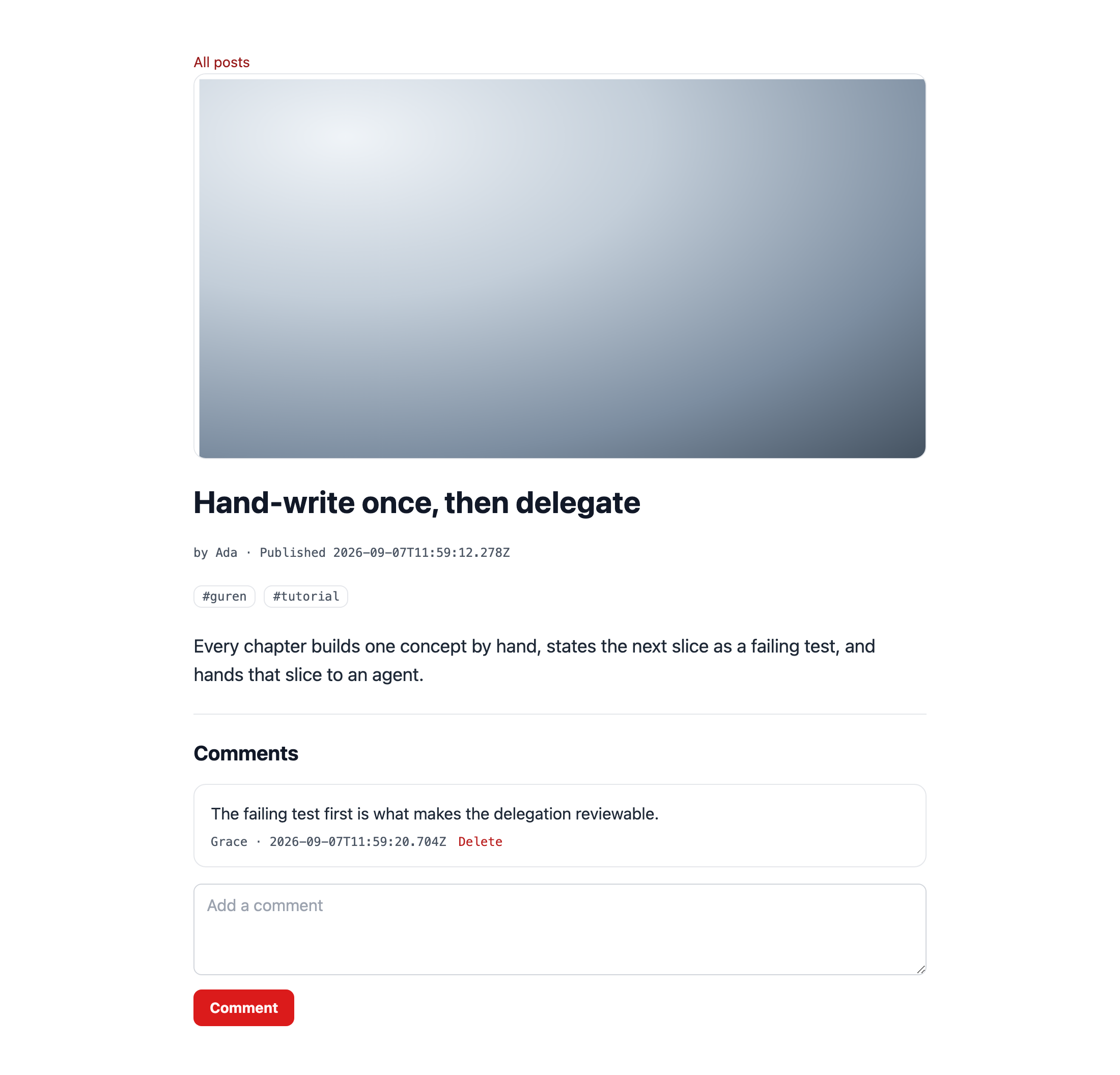
テストが通りました。チェックポイント: 画像付きの投稿を作成してください。画像を新しいタブで開くと、URL は /attachments/<id>/<name>?expires=…&signature=… の形になっています。6 分待ってからそのタブを再読み込みすると 404 になります。リンクの期限が切れたためで、ページのほうは次にレンダリングするときに新しい URL を発行します。この章でいう「プライベート」とは、こういうことです。
4. guren check がファイルについて確かめること
bunx guren check出力のうち 4 行が新しく加わり、どれも通っています。モデルが attachments を宣言していて configureAttachments() もあること、config がスキーマの export するテーブルに結び付いていること、配信が有効で registerAttachmentRoutes() がマウントされていること、ディスク local の保存先が public/ の外にあることの 4 つです。どれも実行時には遅れて、しかも黙って失敗する間違いなので、check で先に捕まえるようになっています。
最後の 1 つは、違反すると長いメッセージ付きの失敗になります。保存先が public/ の中にあるディスクでは、ファイルに届くのに配信ルートを通る必要がありません。そのため配信ルートをどう設定していても、アップロードされたファイルはすべて署名も期限も無い URL で取得できてしまいます。ファイルがサーバー上にあるだけなのか、ウェブに公開されているのかは、ここで分かれます。
このチェックはハーネスからも実行されます。PostToolUse hook がモデルや config ファイルを編集するたびに実行するので、エージェントがディスクを public に「単純化」してしまっても、次の作業に移る前に同じ文言で指摘を受けます。
bunx guren gategit add -A
git commit -m "feat: give posts a cover image on a private disk"5. ギャラリーのテストを先に書く
今度は画像を複数枚持てるようにし、著者はどの画像でも削除できるようにします。attachments のテストに次のケースを追加します。
tests/PostAttachments.test.tsimport { beforeAll, beforeEach, describe, expect, it } from 'bun:test'
import { TestApp } from '@guren/testing'
import app from '../src/app.js'
import { resetDatabase } from '../config/database.js'
import { Post } from '../app/Models/Post.js'
import { User, type UserRecord } from '../app/Models/User.js'

const PNG = Uint8Array.from(
  atob('iVBORw0KGgoAAAANSUhEUgAAAAEAAAABCAYAAAAfFcSJAAAADUlEQVR42mNkYPhfDwAChwGA60e6kgAAAABJRU5ErkJggg=='),
  (char) => char.charCodeAt(0),
)

function image(name: string): File {
  return new File([PNG], name, { type: 'image/png' })
}

function disk() {
  return app.container.make('storage').disk('local')
}

describe('post attachments', () => {
  let http: TestApp
  let ada: UserRecord
  let asAda: TestApp

  beforeAll(async () => {
    http = await TestApp.fromApp(app)
  })

  beforeEach(async () => {
    await resetDatabase()
    ada = await User.create({ name: 'Ada', email: 'ada@example.com', password: 'correct horse battery' })
    asAda = await http.actingAs(ada).withCsrf()
  })

  it('stores a cover with a post and serves it through a signed URL', async () => {
    const form = new FormData()
    form.append('title', 'With a cover')
    form.append('body', 'Look at this')
    form.append('tags', '')
    form.append('cover', image('cover.png'))

    await asAda.post('/posts', form).assertRedirect()

    const post = await Post.where('title', 'With a cover').first()
    const [loaded] = await Post.withAttachments([post!], ['cover'])
    expect(loaded!.cover?.contentType).toBe('image/png')
    expect(loaded!.cover?.url).toContain('/attachments/')
    expect(loaded!.cover?.url).toContain('signature=')

    const response = await http.get(`/posts/${post!.id}`).assertOk()
    await response.assertBodyContains('/attachments/')
  })

  it('replaces the cover, and lets only the author do it', async () => {
    const grace = await User.create({ name: 'Grace', email: 'grace@example.com', password: 'correct horse battery' })
    const asGrace = await http.actingAs(grace).withCsrf()
    const post = await Post.forceCreate({ title: 'Recover', body: 'Body', authorId: ada.id })
    await Post.attach(post.id, 'cover', image('first.png'))

    const attempt = new FormData()
    attempt.append('cover', image('second.png'))
    await asGrace.post(`/posts/${post.id}/cover`, attempt).assertForbidden()

    const replacement = new FormData()
    replacement.append('cover', image('second.png'))
    await asAda.post(`/posts/${post.id}/cover`, replacement).assertRedirect(`/posts/${post.id}`)

    const [loaded] = await Post.withAttachments([post], ['cover'])
    expect(loaded!.cover?.name).toBe('second.png')
  })

  it('removes the files when the post is deleted', async () => {
    const post = await Post.forceCreate({ title: 'Doomed', body: 'Body', authorId: ada.id })
    const attachment = await Post.attach(post.id, 'cover', image('cover.png'))
    expect(await disk().exists(attachment.path)).toBe(true)

    await asAda.delete(`/posts/${post.id}`).assertRedirect('/posts')

    expect(await disk().exists(attachment.path)).toBe(false)
  })

  it('stores gallery images with a post', async () => {
    const form = new FormData()
    form.append('title', 'Gallery')
    form.append('body', 'Pictures')
    form.append('tags', '')
    form.append('images', image('one.png'))
    form.append('images', image('two.png'))

    await asAda.post('/posts', form).assertRedirect()

    const post = await Post.where('title', 'Gallery').first()
    const [loaded] = await Post.withAttachments([post!], ['images'])
    expect(loaded!.images.map((img) => img.name).sort()).toEqual(['one.png', 'two.png'])
  })

  it('lets the author remove one gallery image, and nobody else', async () => {
    const grace = await User.create({ name: 'Grace', email: 'grace@example.com', password: 'correct horse battery' })
    const asGrace = await http.actingAs(grace).withCsrf()
    const post = await Post.forceCreate({ title: 'Gallery', body: 'Pictures', authorId: ada.id })
    const first = await Post.attach(post.id, 'images', image('one.png'))
    await Post.attach(post.id, 'images', image('two.png'))

    await asGrace.delete(`/posts/${post.id}/images/${first.id}`).assertForbidden()

    await asAda.delete(`/posts/${post.id}/images/${first.id}`).assertRedirect(`/posts/${post.id}`)

    const [loaded] = await Post.withAttachments([post], ['images'])
    expect(loaded!.images.map((img) => img.name)).toEqual(['two.png'])
    expect(await disk().exists(first.path)).toBe(false)
  })
})
bun test2 件が失敗します。images は Post が宣言しているコレクションではないからです。
6. エージェントに任せる
エージェントに次のプロンプトを送ります。
Add a gallery to posts: a `hasManyAttached` collection named `images` (images only) on `Post`. The new-post form accepts several files under `images`, `store` attaches each one, the post page shows them, and `DELETE /posts/:id/images/:attachment`, named `posts.images.destroy`, removes one image for the post's author. Load the gallery with `withAttachments` and expose it through `PostResource`. `tests/PostAttachments.test.ts` describes it; make it pass.やることはカバー画像と同じで、それを複数枚に広げるだけです。this.file('cover') の代わりに this.files('images') を、nullable の代わりに配列を使い、差し替えの attach の代わりに attachment の id を渡す detach を使います。
確認項目で見どころになるのは削除ルートです。URL の id で attachment を探すだけでなく、探す範囲をこの投稿のコレクションに限る必要があります。そうすれば、他人の投稿に付いた有効な attachment id が渡されても拒否できます。detach(post.id, 'images', attachmentId) はまさにこの動きをしますが、attachment の id だけで削除する処理を自分で書いた場合はそうなりません。
手元にエージェントが無い場合は、 モデルにコレクションを 1 つ追加します。
app/Models/Post.tsimport { Attachable, defineModel, hasManyAttached, hasOneAttached, type BelongsToRecord, type BelongsToManyRecord, type HasManyRecord } from '@guren/core'
import { posts, postTags } from '../../db/schema.js'
import type { UserRecord } from './User.js'
import type { CommentRecord } from './Comment.js'
import type { TagRecord } from './Tag.js'

export type PostRecord = typeof posts.$inferSelect
export type NewPostRecord = typeof posts.$inferInsert

export class Post extends Attachable(defineModel(posts, { fillable: ['title', 'body'] }), {
  cover: hasOneAttached({ image: 'require' }),
  images: hasManyAttached({ image: 'require' }),
}) {
  static override relationTypes: {
    author: BelongsToRecord<UserRecord>
    comments: HasManyRecord<CommentRecord>
    tags: BelongsToManyRecord<TagRecord>
  } = { author: null, comments: [], tags: [] }
}

Post.belongsTo('author', () => import('./User.js').then((m) => m.User), 'authorId', 'id')
Post.hasMany('comments', () => import('./Comment.js').then((m) => m.Comment), 'postId', 'id')
Post.belongsToMany('tags', () => import('./Tag.js').then((m) => m.Tag), postTags, 'postId', 'tagId')
app/Http/Validators/PostValidator.tsimport { z } from 'zod'

export const PostIdParamSchema = z.object({
  id: z.coerce.number().int().positive(),
})

export const PostImageParamSchema = z.object({
  id: z.coerce.number().int().positive(),
  attachment: z.string().min(1),
})

export const PostPayloadSchema = z.object({
  title: z.string().trim().min(1, 'Title is required').max(120, 'Title must be 120 characters or fewer'),
  body: z.string().trim().min(1, 'Body is required'),
  tags: z
    .string()
    .default('')
    .transform((value) => [...new Set(value.split(',').map((tag) => tag.trim().toLowerCase()).filter((tag) => tag.length > 0))]),
})

export type PostPayload = z.infer<typeof PostPayloadSchema>

export const ListPostsQuerySchema = z.object({
  page: z.coerce.number().int().min(1).default(1),
})
app/Http/Resources/PostResource.tsimport { Resource, type AttachmentData } from '@guren/core'
import type { PostRecord } from '../../Models/Post.js'
import type { UserRecord } from '../../Models/User.js'
import type { TagRecord } from '../../Models/Tag.js'

export type PostWithRelations = PostRecord & {
  author?: UserRecord | null
  tags?: TagRecord[]
  cover?: AttachmentData | null
  images?: AttachmentData[]
}

export interface PostResourceData extends Record<string, unknown> {
  id: number
  title: string
  body: string
  createdAt: string
  publishedAt: string | null
  author: { id: number; name: string } | null
  tags: string[]
  cover: AttachmentData | null
  images: AttachmentData[]
}

export class PostResource extends Resource<PostWithRelations, PostResourceData> {
  toArray(): PostResourceData {
    const author = this.resource.author
    return {
      id: this.resource.id,
      title: this.resource.title,
      body: this.resource.body,
      createdAt: this.resource.createdAt,
      publishedAt: this.resource.publishedAt,
      author: author ? { id: author.id, name: author.name } : null,
      tags: (this.resource.tags ?? []).map((tag) => tag.name),
      cover: this.resource.cover ?? null,
      images: this.resource.images ?? [],
    }
  }
}
app/Http/Controllers/PostController.tsimport { Controller, ValidationException, paginate, type PaginatedPageProps } from '@guren/core'
import { pages } from '@/.guren/pages.gen'
import { Post } from '../../Models/Post.js'
import { Comment } from '../../Models/Comment.js'
import { Tag } from '../../Models/Tag.js'
import { PostTag } from '../../Models/PostTag.js'
import type { UserRecord } from '../../Models/User.js'
import { PostResource, type PostResourceData } from '../Resources/PostResource.js'
import { CommentResource } from '../Resources/CommentResource.js'
import { ListPostsQuerySchema, PostIdParamSchema, PostImageParamSchema, PostPayloadSchema } from '../Validators/PostValidator.js'

type PostsIndexProps = PaginatedPageProps<PostResourceData>

async function syncTags(postId: number, names: string[]): Promise<void> {
  await PostTag.delete({ postId })
  for (const name of names) {
    const tag = (await Tag.first({ name })) ?? (await Tag.create({ name }))
    await PostTag.forceCreate({ postId, tagId: tag.id })
  }
}

export default class PostController extends Controller {
  async index(): Promise<Response> {
    const { page } = this.validateQuery(ListPostsQuerySchema)
    const result = await Post.withPaginate('author', { page, perPage: 10, orderBy: ['id', 'desc'] })
    const paginator = paginate(result, { path: this.request.path ?? '/posts' })

    return this.inertia(pages.posts.Index, {
      data: result.data.map((post) => new PostResource(post).toJSON()),
      pagination: {
        meta: paginator.meta(),
        links: paginator.links(),
      },
    } satisfies PostsIndexProps)
  }

  async show(): Promise<Response> {
    const { id } = this.validateParams(PostIdParamSchema)
    const post = await Post.findWithOrFail(id, ['author', 'tags'])
    const [withFiles] = await Post.withAttachments([post], ['cover', 'images'])
    const comments = await Comment.where('postId', post.id).with('author').orderBy('id', 'asc').get()

    return this.inertia(pages.posts.Show, {
      post: new PostResource(withFiles!).toJSON(),
      canManage: await this.can('update', [Post, post]),
      comments: await Promise.all(
        comments.map(async (comment) => ({
          ...new CommentResource(comment).toJSON(),
          canDelete: await this.can('delete', [Comment, comment]),
        })),
      ),
    })
  }

  async create(): Promise<Response> {
    return this.inertia(pages.posts.New, {})
  }

  async store(): Promise<Response> {
    const author = await this.auth.userOrFail<UserRecord>()
    const { tags, ...data } = await this.validateBody(PostPayloadSchema)
    const post = await Post.create(data, { set: { authorId: author.id } })
    await syncTags(post.id, tags)
    const cover = await this.file('cover')
    if (cover) {
      await Post.attach(post.id, 'cover', cover)
    }
    for (const file of await this.files('images')) {
      await Post.attach(post.id, 'images', file)
    }
    return this.redirect(`/posts/${post.id}`)
  }

  async edit(): Promise<Response> {
    const post = this.model(Post)
    await this.authorize('update', [Post, post])
    const withTags = await Post.findWithOrFail(post.id, 'tags')

    return this.inertia(pages.posts.Edit, {
      post: new PostResource(withTags).toJSON(),
    })
  }

  async update(): Promise<Response> {
    const post = this.model(Post)
    await this.authorize('update', [Post, post])
    const { tags, ...data } = await this.validateBody(PostPayloadSchema)
    await Post.update({ id: post.id }, data)
    await syncTags(post.id, tags)
    return this.redirect(`/posts/${post.id}`)
  }

  async cover(): Promise<Response> {
    const post = this.model(Post)
    await this.authorize('update', [Post, post])
    const cover = await this.file('cover')
    if (!cover) {
      throw new ValidationException({ cover: ['Choose an image.'] })
    }
    await Post.attach(post.id, 'cover', cover)
    return this.redirect(`/posts/${post.id}`)
  }

  async destroyImage(): Promise<Response> {
    const post = this.model(Post)
    await this.authorize('update', [Post, post])
    const { attachment } = this.validateParams(PostImageParamSchema)
    await Post.detach(post.id, 'images', attachment)
    return this.redirect(`/posts/${post.id}`)
  }

  async destroy(): Promise<Response> {
    const post = this.model(Post)
    await this.authorize('delete', [Post, post])
    await Post.purgeAttachments(post.id)
    await Post.delete({ id: post.id })
    return this.redirect('/posts')
  }

  async publish(): Promise<Response> {
    const post = this.model(Post)
    await this.authorize('publish', [Post, post])
    await Post.forceUpdate({ id: post.id }, { publishedAt: new Date().toISOString() })
    return this.redirect(`/posts/${post.id}`)
  }

  async unpublish(): Promise<Response> {
    const post = this.model(Post)
    await this.authorize('publish', [Post, post])
    await Post.forceUpdate({ id: post.id }, { publishedAt: null })
    return this.redirect(`/posts/${post.id}`)
  }
}
routes/web.tsimport { Router, registerAttachmentRoutes, requireAuthenticated, requireGuest } from '@guren/core'
import HomeController from '../app/Http/Controllers/HomeController.js'
import AboutController from '../app/Http/Controllers/AboutController.js'
import ContactController from '../app/Http/Controllers/ContactController.js'
import PostController from '../app/Http/Controllers/PostController.js'
import CommentController from '../app/Http/Controllers/CommentController.js'
import LinkController from '../app/Http/Controllers/LinkController.js'
import RegisterController from '../app/Http/Controllers/Auth/RegisterController.js'
import LoginController from '../app/Http/Controllers/Auth/LoginController.js'
import ProfileController from '../app/Http/Controllers/ProfileController.js'
import { Post } from '../app/Models/Post.js'
import { Comment } from '../app/Models/Comment.js'
import { Link } from '../app/Models/Link.js'
import { PostIdParamSchema, PostImageParamSchema, PostPayloadSchema } from '../app/Http/Validators/PostValidator.js'
import { CommentPayloadSchema } from '../app/Http/Validators/CommentValidator.js'
import { LinkPayloadSchema } from '../app/Http/Validators/LinkValidator.js'
import { RegisterSchema } from '../app/Http/Validators/RegisterValidator.js'
import { LoginSchema } from '../app/Http/Validators/LoginValidator.js'

export function registerWebRoutes(baseRouter: Router): void {
  // The signed delivery route for private attachments (config/attachments.ts).
  registerAttachmentRoutes(baseRouter)

  // aliasMiddleware() returns a Router carrying the alias name in its type;
  // capture it, or `.middleware('auth')` below will not compile.
  const router = baseRouter
    .aliasMiddleware('auth', requireAuthenticated({ redirectTo: '/login' }))
    .aliasMiddleware('guest', requireGuest({ redirectTo: '/' }))

  router.get('/', [HomeController, 'index'])
  router.get('/about', [AboutController, 'index']).name('about')
  router.get('/contact', [ContactController, 'index']).name('contact')

  router.middleware('guest').group((guest) => {
    guest.get('/register', [RegisterController, 'show']).name('register')
    guest.post('/register', { name: 'register.store', body: RegisterSchema }, [RegisterController, 'store'])
    guest.get('/login', [LoginController, 'show']).name('login')
    guest.post('/login', { name: 'login.store', body: LoginSchema }, [LoginController, 'store'])
  })

  router.middleware('auth').group((auth) => {
    auth.post('/logout', [LoginController, 'destroy']).name('logout')
    auth.get('/profile', [ProfileController, 'show']).name('profile')
    auth.get('/posts/create', [PostController, 'create']).name('posts.create')
    auth.get('/posts/:id/edit', { bind: { id: Post }, name: 'posts.edit' }, [PostController, 'edit'])
    auth.post('/posts', { name: 'posts.store', body: PostPayloadSchema }, [PostController, 'store'])
    auth.put('/posts/:id', { bind: { id: Post }, name: 'posts.update', body: PostPayloadSchema }, [PostController, 'update'])
    auth.delete('/posts/:id', { bind: { id: Post }, name: 'posts.destroy' }, [PostController, 'destroy'])
    auth.post('/posts/:id/publish', { bind: { id: Post }, name: 'posts.publish' }, [PostController, 'publish'])
    auth.post('/posts/:id/unpublish', { bind: { id: Post }, name: 'posts.unpublish' }, [PostController, 'unpublish'])
    auth.post('/posts/:id/cover', { bind: { id: Post }, name: 'posts.cover' }, [PostController, 'cover'])
    auth.delete('/posts/:id/images/:attachment', { bind: { id: Post }, name: 'posts.images.destroy', params: PostImageParamSchema }, [PostController, 'destroyImage'])
    auth.post('/posts/:id/comments', { bind: { id: Post }, name: 'comments.store', body: CommentPayloadSchema }, [CommentController, 'store'])
    auth.delete('/comments/:id', { bind: { id: Comment }, name: 'comments.destroy' }, [CommentController, 'destroy'])
    auth.get('/links/create', [LinkController, 'create']).name('links.create')
    auth.get('/links/:id/edit', { bind: { id: Link }, name: 'links.edit' }, [LinkController, 'edit'])
    auth.post('/links', { name: 'links.store', body: LinkPayloadSchema }, [LinkController, 'store'])
    auth.put('/links/:id', { bind: { id: Link }, name: 'links.update', body: LinkPayloadSchema }, [LinkController, 'update'])
    auth.delete('/links/:id', { bind: { id: Link }, name: 'links.destroy' }, [LinkController, 'destroy'])
  })

  router.get('/posts', [PostController, 'index']).name('posts.index')
  router.get('/posts/:id', { name: 'posts.show', params: PostIdParamSchema }, [PostController, 'show'])
  router.get('/links', [LinkController, 'index']).name('links.index')
  router.get('/links/:id', { bind: { id: Link }, name: 'links.show' }, [LinkController, 'show'])

  // Health check endpoint for load balancers and uptime monitors
  router.get('/health', (c) => c.json({ status: 'ok' }))
}
フォームは、1 つの名前で複数のファイルを受け取ります。
resources/js/pages/posts/New.tsximport { Head, useForm } from '@inertiajs/react'
import type { ApiRoutes } from '@/.guren/api-client.gen'
import type { RouteBody } from '@guren/inertia-client/typed-forms'
import { route } from '@/.guren/routes.gen'

// Inertia switches the request to FormData as soon as the data holds a File.
type PostForm = RouteBody<ApiRoutes, 'posts.store'> & { cover: File | null; images: File[] }

const inputClass =
  'w-full rounded-g-ctl border border-g-line-strong bg-g-panel px-3 py-2 text-g-text transition outline-none placeholder:text-g-muted focus:border-transparent focus:outline-2 focus:-outline-offset-1 focus:outline-g-accent'

export default function NewPost() {
  const form = useForm<PostForm>({ title: '', body: '', tags: '', cover: null, images: [] })

  return (
    <>
      <Head title="New post" />
      <main className="min-h-screen bg-g-page font-sans text-g-text">
        <div className="mx-auto max-w-3xl space-y-6 px-6 py-12">
          <h1 className="text-3xl font-bold text-g-heading">New post</h1>
          <form
            className="space-y-4"
            onSubmit={(event) => {
              event.preventDefault()
              form.post(route('posts.store'))
            }}
          >
            <div>
              <input value={form.data.title} onChange={(event) => form.setData('title', event.target.value)} placeholder="Title" className={inputClass} />
              {form.errors.title && <p className="mt-1 text-sm text-g-danger">{form.errors.title}</p>}
            </div>
            <div>
              <textarea value={form.data.body} onChange={(event) => form.setData('body', event.target.value)} placeholder="Body" rows={8} className={inputClass} />
              {form.errors.body && <p className="mt-1 text-sm text-g-danger">{form.errors.body}</p>}
            </div>
            <div>
              <input value={form.data.tags} onChange={(event) => form.setData('tags', event.target.value)} placeholder="Tags, comma-separated" className={inputClass} />
              {form.errors.tags && <p className="mt-1 text-sm text-g-danger">{form.errors.tags}</p>}
            </div>
            <div>
              <label className="block text-sm text-g-text-2">
                Cover image
                <input type="file" accept="image/*" onChange={(event) => form.setData('cover', event.target.files?.[0] ?? null)} className="mt-1 block w-full text-sm" />
              </label>
              {form.errors.cover && <p className="mt-1 text-sm text-g-danger">{form.errors.cover}</p>}
            </div>
            <div>
              <label className="block text-sm text-g-text-2">
                Gallery
                <input type="file" accept="image/*" multiple onChange={(event) => form.setData('images', Array.from(event.target.files ?? []))} className="mt-1 block w-full text-sm" />
              </label>
              {form.errors.images && <p className="mt-1 text-sm text-g-danger">{form.errors.images}</p>}
            </div>
            <button type="submit" disabled={form.processing} className="rounded-g-ctl bg-g-accent px-4 py-2 text-sm font-bold text-g-on-accent transition hover:bg-g-accent-down">
              Publish
            </button>
          </form>
        </div>
      </main>
    </>
  )
}
投稿ページにはギャラリーを表示し、著者には画像ごとの削除ボタンを付けます。
resources/js/pages/posts/Show.tsximport { Head, Link, useForm, usePage } from '@inertiajs/react'
import type { ApiRoutes } from '@/.guren/api-client.gen'
import type { RouteBody } from '@guren/inertia-client/typed-forms'
import type { PostResourceData } from '@/app/Http/Resources/PostResource'
import type { CommentResourceData } from '@/app/Http/Resources/CommentResource'
import { route } from '@/.guren/routes.gen'

type CommentForm = RouteBody<ApiRoutes, 'comments.store'>

interface Props {
  post: PostResourceData
  canManage: boolean
  comments: (CommentResourceData & { canDelete: boolean })[]
}

export default function PostShow({ post, canManage, comments }: Props) {
  const { props } = usePage<{ auth?: { user?: { name?: string } | null } }>()
  const signedIn = Boolean(props.auth?.user)
  const form = useForm<CommentForm>({ body: '' })
  const coverForm = useForm<{ cover: File | null }>({ cover: null })

  return (
    <>
      <Head title={post.title} />
      <main className="min-h-screen bg-g-page font-sans text-g-text">
        <div className="mx-auto max-w-3xl space-y-6 px-6 py-12">
          <Link href={route('posts.index')} className="text-sm text-g-accent-text transition hover:underline">
            All posts
          </Link>
          {post.cover && (
            <img src={post.cover.url} alt="" width={post.cover.width ?? undefined} height={post.cover.height ?? undefined} className="w-full rounded-g-card border border-g-line object-cover" />
          )}
          <h1 className="text-3xl font-bold text-g-heading">{post.title}</h1>
          <p className="font-mono text-xs text-g-text-2">
            by {post.author?.name ?? 'unknown'} · {post.publishedAt ? `Published ${post.publishedAt}` : 'Draft'}
          </p>
          {post.tags.length > 0 && (
            <p className="flex flex-wrap gap-2">
              {post.tags.map((tag) => (
                <span key={tag} className="rounded-g-ctl border border-g-line px-2 py-0.5 font-mono text-xs text-g-text-2">
                  #{tag}
                </span>
              ))}
            </p>
          )}
          <p className="whitespace-pre-wrap text-lg">{post.body}</p>
          {post.images.length > 0 && (
            <div className="grid grid-cols-2 gap-3 sm:grid-cols-3">
              {post.images.map((imageItem) => (
                <figure key={imageItem.id} className="space-y-1">
                  <img src={imageItem.url} alt="" className="aspect-square w-full rounded-g-card border border-g-line object-cover" />
                  {canManage && (
                    <Link href={route('posts.images.destroy', { id: post.id, attachment: imageItem.id })} method="delete" as="button" className="font-mono text-xs text-g-danger hover:underline">
                      Remove
                    </Link>
                  )}
                </figure>
              ))}
            </div>
          )}
          {canManage && (
            <div className="space-y-3">
              <div className="flex items-center gap-4">
                <Link href={route('posts.edit', { id: post.id })} className="text-g-accent-text transition hover:underline">
                  Edit
                </Link>
                {post.publishedAt ? (
                  <Link href={route('posts.unpublish', { id: post.id })} method="post" as="button" className="rounded-g-ctl border border-g-line-strong px-3 py-1 text-sm text-g-text transition hover:border-g-muted">
                    Unpublish
                  </Link>
                ) : (
                  <Link href={route('posts.publish', { id: post.id })} method="post" as="button" className="rounded-g-ctl bg-g-accent px-3 py-1 text-sm font-bold text-g-on-accent transition hover:bg-g-accent-down">
                    Publish
                  </Link>
                )}
                <Link
                  href={route('posts.destroy', { id: post.id })}
                  method="delete"
                  as="button"
                  onBefore={() => window.confirm('Delete this post?')}
                  className="rounded-g-ctl border border-g-danger-chip px-3 py-1 text-sm font-bold text-g-danger transition hover:bg-g-danger-tint"
                >
                  Delete
                </Link>
              </div>
              <form
                className="flex items-center gap-3 text-sm"
                onSubmit={(event) => {
                  event.preventDefault()
                  coverForm.post(route('posts.cover', { id: post.id }), { onSuccess: () => coverForm.reset() })
                }}
              >
                <input type="file" accept="image/*" onChange={(event) => coverForm.setData('cover', event.target.files?.[0] ?? null)} className="text-sm" />
                <button type="submit" disabled={coverForm.processing || !coverForm.data.cover} className="rounded-g-ctl border border-g-line-strong px-3 py-1 text-g-text transition hover:border-g-muted">
                  {post.cover ? 'Replace cover' : 'Add cover'}
                </button>
                {coverForm.errors.cover && <span className="text-g-danger">{coverForm.errors.cover}</span>}
              </form>
            </div>
          )}

          <section className="space-y-4 border-t border-g-line pt-6">
            <h2 className="text-xl font-bold text-g-heading">Comments</h2>
            {comments.length === 0 && <p className="text-g-text-2">No comments yet.</p>}
            {comments.map((comment) => (
              <article key={comment.id} className="rounded-g-card border border-g-line bg-g-panel p-4">
                <p className="whitespace-pre-wrap">{comment.body}</p>
                <p className="mt-2 flex items-center gap-3 font-mono text-xs text-g-text-2">
                  <span>{comment.author?.name ?? 'unknown'} · {comment.createdAt}</span>
                  {comment.canDelete && (
                    <Link href={route('comments.destroy', { id: comment.id })} method="delete" as="button" className="text-g-danger hover:underline">
                      Delete
                    </Link>
                  )}
                </p>
              </article>
            ))}
            {signedIn ? (
              <form
                className="space-y-2"
                onSubmit={(event) => {
                  event.preventDefault()
                  form.post(route('comments.store', { id: post.id }), { onSuccess: () => form.reset() })
                }}
              >
                <textarea
                  value={form.data.body}
                  onChange={(event) => form.setData('body', event.target.value)}
                  placeholder="Add a comment"
                  rows={3}
                  className="w-full rounded-g-ctl border border-g-line-strong bg-g-panel px-3 py-2 text-g-text transition outline-none placeholder:text-g-muted focus:border-transparent focus:outline-2 focus:-outline-offset-1 focus:outline-g-accent"
                />
                {form.errors.body && <p className="text-sm text-g-danger">{form.errors.body}</p>}
                <button type="submit" disabled={form.processing} className="rounded-g-ctl bg-g-accent px-4 py-2 text-sm font-bold text-g-on-accent transition hover:bg-g-accent-down">
                  Comment
                </button>
              </form>
            ) : (
              <p className="text-sm text-g-text-2">
                <Link href={route('login')} className="text-g-accent-text hover:underline">Sign in</Link> to comment.
              </p>
            )}
          </section>
        </div>
      </main>
    </>
  )
}
bun run codegenbun test確認項目は次のとおりです。
imagesがhasManyAttached({ image: 'require' })で宣言されていて、モデルのほかの宣言は変わっていない。storeがthis.files('images')のファイルをすべて attach している。destroyImageは、投稿の範囲に絞ったdetach(post.id, 'images', attachmentId)で 1 枚を削除し、投稿へのほかの変更と同じく、その前にauthorize('update', ...)を通している。showがcoverとimagesを 1 回のwithAttachments呼び出しで読み込み、リソースがギャラリーをAttachmentData[]として公開している。- 削除ルートは
authグループの中にあり、投稿にはbind、attachment の id にはparamsスキーマが付いている。 - attachment のテスト 5 件がすべて通り、
guren checkの attachment のルール 4 つも引き続き通っている。
チェックポイント: 画像が 3 枚付いた投稿があり、4 枚目は一度追加してから削除してある状態です。
bunx guren gategit add -A
git commit -m "feat: add a gallery to posts"ここまでの状態
- attachments レイヤーができました。ファイルは private なディスクに置かれて署名付きのルートから配信され、テーブル、config、prune コマンドもそろっています。
- 投稿ごとにカバー画像を設定できます。フォームからアップロードし、専用のルートで差し替え、投稿を削除すると一緒に purge されます。
- エージェントに任せてギャラリーを作りました。画像は、その投稿の範囲で 1 枚ずつ削除できます。
guren checkには attachment のルールが 4 つあり、ディスクのルールが警告ではなく失敗になる理由も分かりました。
よくあるつまずき
guren checkが「Attachable model wiring」で失敗する。 モデルがAttachableを mixin しているのに、config/、src/、app/のどこにもconfigureAttachments()の呼び出しがありません。mixin は最初に使われた時点でレイヤーを解決するので、このチェックが無ければ最初のアップロードで初めて失敗します。bunx guren add attachmentsを実行すれば、足りない側が導入されます。- ブラウザで画像の URL が 404 になる。 署名付き URL の期限(既定では 5 分)が切れています。ページを再読み込みすれば新しい URL が発行されます。新しくレンダリングしたページでも 404 になるなら、
registerAttachmentRoutesがマウントされていません。 - 編集フォームからアップロードしても何も起きない。 ファイル付きの
form.put()にはメソッドの偽装が必要ですが、フレームワークはそれを行いません。posts.coverと同じように、ファイルはPOSTのルートで送ってください。 - 「The file must be an image.」
image: 'require'は拡張子でなく中身のバイト列を見ます。名前だけ変えたテキストファイルは拒否され、.jpgという名前の本物の PNG は受け付けられます。 storage/app/attachmentsに、どの行からも参照されないファイルが残る。 原因は 2 つ考えられます。1 つは、destroyがpurgeAttachmentsを呼ばずに投稿を削除した場合です。attachments テーブルには代わりに purge してくれる外部キーが無いので、bun run console attachments:pruneで残ったファイルを見つけてください。もう 1 つは、テストが開発用のディスクに書き込んだ場合です。localディスクにNODE_ENV === 'test'の分岐が入る前に雛形で作られたStorageProviderでは、テストのアップロードがすべて./storage/appに入ります。そのrootに同じ分岐を加えてから、bun run console attachments:prune --objectsを一度実行してください。どの行からも参照されないプレフィックスが削除されます。ただし直近 1 時間以内に作られたものは残ります。テストのアップロードは、テスト用データベースに最後の行が残るのと同じように、実行をまたいで./storage/app/testingに残ります。古いものはNODE_ENV=test bun run console attachments:prune --objectsで削除できます。直前の実行の行が参照するファイルと直近 1 時間以内のものは残すので、bun testの直後に実行しても何も報告されません。
演習
- テキストファイルを
cover.pngに改名してアップロードしてください。アプリは何を返しますか。それを決めているのはPostのどの行ですか。次に、本物の PNG をcover.txtに改名してアップロードし、両者の違いを一文で説明してください。 - カバー画像の付いた投稿を削除してから、
bun run console attachments:prune --dry-runを実行してください。何も報告されないはずです。このコマンドが何かを見つけるのは、destroyでどんな問題が起きたときですか。
演習 1: ヒントと答えの例
app/Models/Post.ts で Post が cover をどう宣言しているかを見てください。
cover.png に改名したテキストファイルは、cover のバリデーションエラー「The file must be an image.」で拒否されます。決めているのは cover: hasOneAttached({ image: 'require' }) の行です。'require' のとき、attach() はアップロードの先頭のバイト列に画像のシグネチャがあるかを調べ、ファイル名やブラウザが申告した型は判定に使いません。そのため、cover.txt に改名した本物の PNG は受け付けられ、cover.txt という名前のまま、コンテンツタイプ image/png で保存されます。
一文で言えば、attachments レイヤーはファイルの種類を中身のバイト列で判断し、名前は見ません。
新規投稿のフォームからアップロードした場合、attach() がファイルを拒否する前に store が投稿を保存しています。そのため、カバー画像のない投稿が残ります。
演習 2: ヒントと答えの例
コマンドが何を比べているかを確認してください。添付ファイルの各行の attachableType を config/attachments.ts の Model.morphMap で解決し、持ち主のレコードを探しています。
attachments:prune が報告するのは、持ち主がもう存在しない行です。destroy は Post.delete(...) の前に Post.purgeAttachments(post.id) を呼ぶので、そうした行は残りません。このコマンドが何かを見つけるのは、purge を通らずに投稿が消えたときです。たとえば destroy からこの呼び出しを消した場合や、purge を呼ばない別の経路(コンソールコマンド、スクリプト、別のアクション)で投稿を削除した場合です。
--objects を付けると、どの行からも参照されていない attachments/ 以下の保存ファイルも探します。Model.morphMap に載っていないモデルの行は、スキップしたと報告されるだけで削除はされません。
次へ
第 11 章: イベントとメール では、誰かがコメントしたときに投稿の著者へ知らせる仕組みを作ります。イベント、リスナー、キューに積むジョブ、メールを使い、コメントした全員への一斉送信はエージェントに任せます。