
First Steps: A 10-Minute Tour of One Request
This tour follows a single request, GET /posts, through every layer of a Guren app: route, controller, validation, model, resource, Inertia page, and test. Read it to build a mental map; each stop links to the guide that goes deeper.
First Steps: A 10-Minute Tour of One Request
This tour follows a single request, GET /posts, through every layer of a Guren app: route, controller, validation, model, resource, Inertia page, and test. Read it to build a mental map; each stop links to the guide that goes deeper.
It assumes a running app (see Getting Started) with a posts resource generated by:
bunx guren add resource posts --fields "title:string,body:text,published:boolean"Prefer to build this yourself step by step? Take The Guren Tutorial instead: it covers the same ground hands-on, and then keeps going.
Here is the whole path first. GET /posts moves through these layers in order, and HTML comes back out.
flowchart TD
  Browser["Browser<br/>GET /posts"]
  Route["1. Route<br/>routes/web.ts"]
  Controller["2. Controller<br/>PostController.index()"]
  Validator["3. Validation<br/>ListPostsQuerySchema"]
  Model["4. Model<br/>Post.paginate()"]
  Database[("Database<br/>posts table")]
  Resource["5. Resource<br/>PostResource"]
  Page["6. Inertia page<br/>posts/Index.tsx"]

  Browser --> Route --> Controller
  Controller --> Validator --> Model
  Model <--> Database
  Model --> Resource --> Page
  Page -- "rendered response" --> Browser
The rest of this tour walks the stops one at a time.
1. The route
Every request starts in routes/web.ts, where a registrar maps URLs to controller actions:
import { Router } from '@guren/core'
import PostController from '@/app/Http/Controllers/PostController'

export function registerWebRoutes(router: Router): void {
  router.get('/posts', [PostController, 'index'])
  router.post('/posts', [PostController, 'store'])
}
GET /posts matches the first line, so Guren dispatches to PostController.index. Groups, middleware, and named routes all live here too (see the Routing Guide).
2. The controller
app/Http/Controllers/PostController.ts handles the request:
import { Controller } from '@guren/core'
import { Post } from '@/app/Models/Post'
import { PostResource } from '@/app/Http/Resources/PostResource'
import { ListPostsQuerySchema } from '@/app/Http/Validators/PostValidator'
import { pages } from '@/.guren/pages.gen'

export default class PostController extends Controller {
  async index() {
    const { page } = this.validateQuery(ListPostsQuerySchema)
    const result = await Post.paginate({ page, perPage: 20 })

    return this.inertia(pages.posts.Index, {
      data: result.data.map((post) => new PostResource(post).toJSON()),
    })
  }
}
Three things happen: input is validated, data is fetched, and a page is rendered. The Controller Guide covers the full toolbox.
3. Validation
this.validateQuery(schema) parses the query string against a Zod schema and throws a 422 automatically on bad input, with no manual error handling:
import { z } from 'zod'

export const ListPostsQuerySchema = z.object({
  page: z.coerce.number().int().positive().default(1),
})
validateBody and validateParams work the same way for request bodies and route parameters. See the Validation Guide.
4. The model
app/Models/Post.ts binds a class to a Drizzle table from db/schema.ts:
import { defineModel } from '@guren/core'
import { posts } from '@/db/schema'

export class Post extends defineModel(posts) {}
Queries read like Laravel: Post.find(1), Post.findOrFail(1) (throws a 404), Post.where('published', true).get(). Column types flow from the schema into every result. See the Database Guide.
5. The resource
app/Http/Resources/PostResource.ts decides what leaves the server, so internal columns never leak by accident:
import { Resource } from '@guren/core'

export class PostResource extends Resource<Post> {
  toArray() {
    const { id, title, body, published } = this.resource
    return { id, title, body, published }
  }
}
See the API Resources Guide.
6. The Inertia page
this.inertia(pages.posts.Index, props) renders resources/js/pages/posts/Index.tsx — a plain React component that receives the controller's props directly, no API layer in between:
import type { PageProps } from '@guren/inertia-client/contracts'
import { pages } from '@/.guren/pages.gen'

type Props = PageProps<typeof pages.posts.Index>

export default function PostsIndex({ data }: Props) {
  return (
    <ul>
      {data.map((post) => (
        <li key={post.id}>{post.title}</li>
      ))}
    </ul>
  )
}
The index page bunx guren add resource generates arrives a little more finished than this:
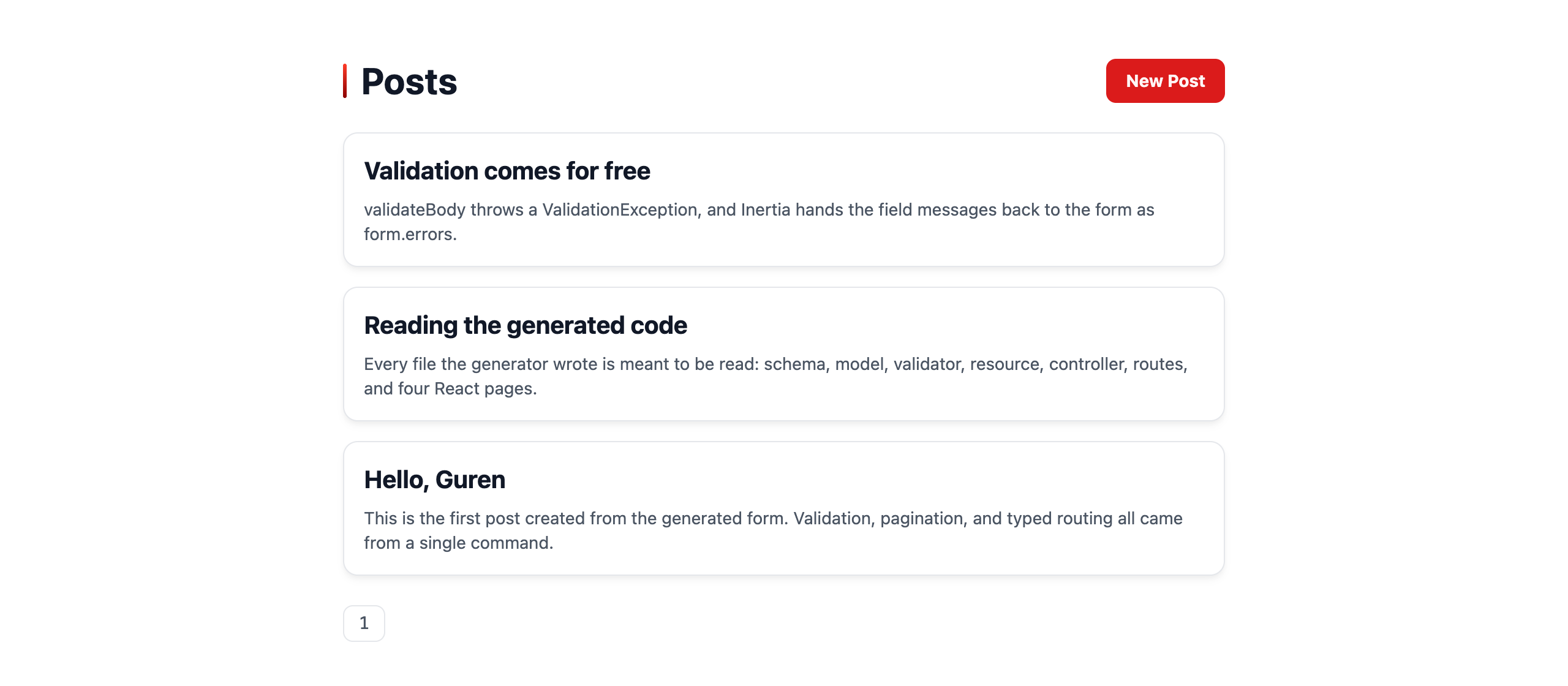
Codegen extracts each page's Props into .guren/pages.gen.ts, so a controller passing the wrong shape is a compile error. Rename a column and TypeScript flags every layer from schema to browser. See the Frontend Guide.
7. The test
Prove the whole path works with TestApp, which drives real requests through your booted app:
import { test } from 'bun:test'
import { TestApp } from '@guren/testing'

test('lists posts', async () => {
  const app = await TestApp.create()
  await app.get('/posts').assertOk()
})
See the Testing Guide for fluent assertions, actingAs, and database helpers.
8. Project knowledge
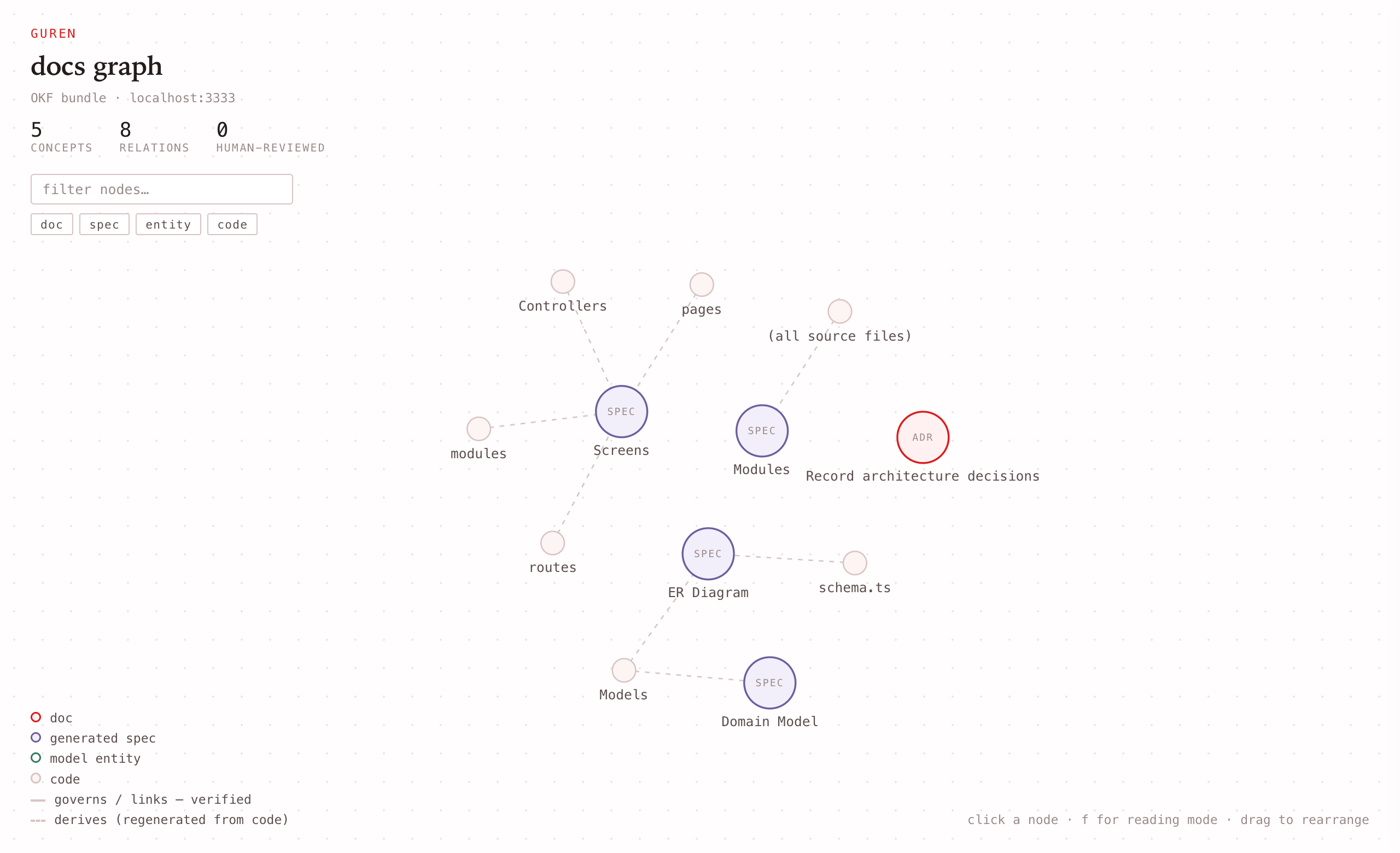
The request path explains what the application does; project knowledge records why it works that way and keeps the overview current. bunx guren spec:generate derives ER, domain, screen, and module views from the code. ADRs created with bunx guren make:adr declare the entities and paths they govern, while bunx guren check --docs validates those relations.
With bun run dev running, open http://localhost:3333/_guren/docs to browse those documents, entities, and code paths as one interactive Docs Graph. The graph surrounds the request path above with its rationale and generated views; it does not replace the route-to-page flow. See Spec-Anchored Development for the full workflow.
The mental model
Every feature in a Guren app follows this same path:
- routes map URLs to controllers
- validators parse inputs
- models describe data access
- resources shape outputs
- pages define props
- controllers compose it all
Around that runtime path, project knowledge connects generated specs and human decisions back to the code they describe, then checks that the connections remain valid.
To add a feature, scaffold the whole path at once and refresh the manifests:
bunx guren add resource comments --fields "body:text,postId:integer"
bun run codegen
Where to go next
Ready to build for real? The Guren Tutorial walks you through posts, users, authorization, uploads, mail and agent tools hands-on. If any term was unfamiliar, check the Glossary.