
Chapter 1: Zero to a Shipped App
In this chapter you scaffold a Guren app, read what the scaffold gave you, make one change by hand with a test in front of it, hand one change to a coding agent and watch the harness check its work, and finish with a container image you can run anywhere. Every later chapter ends the same way: gate green, committed, shippable.
Chapter 1: Zero to a Shipped App
In this chapter you scaffold a Guren app, read what the scaffold gave you, make one change by hand with a test in front of it, hand one change to a coding agent and watch the harness check its work, and finish with a container image you can run anywhere. Every later chapter ends the same way: gate green, committed, shippable.
This is the one chapter that does not follow the four beats. It is the setup chapter, so there is nothing to build by hand yet; instead you learn the tools every later chapter assumes: the test runner, guren gate, and the agent harness.
What you'll learn:
- How to scaffold an app with every choice made up front, so your app matches this text
- What arrives in a fresh app: a test, a CI workflow, and an agent harness
- What
bunx guren gateruns, and why it is the same command CI runs - How the three hooks in
.claude/settings.jsonfeedguren checkandguren gateback to an agent - How to write a failing test before a change, then make it pass
- How to turn the app into a container image with
guren deploy
1. Scaffold the app
The scaffolder asks four questions when you run it interactively. Answer them on the command line instead, so your app is the one this course describes:
bunx create-guren-app guren-blog --mode ssr --db sqlite --agents claude --git--mode ssrrenders pages on the server first. The other mode,spa, sends an empty shell and renders in the browser.--db sqliteneeds no database server: the file is created under./data/the first time it is opened. Chapter 14 moves the same app to Postgres.--agents claudeinstalls the agent harness for Claude Code.--agents allinstalls it for Claude Code, Codex, Cursor, Copilot and OpenCode at once;noneskips it. Everything in this course works with any of them, and the harness is what makes that true.--gitinitialises a repository and makes the first commit, so every chapter can end with one.
The scaffolder copies the template, writes a .env with a generated APP_KEY and DATABASE_URL=./data/guren.db, and installs dependencies. Step into the app:
cd guren-blog2. Run it
bun run devCheckpoint: open http://localhost:3333. You should see the welcome page, headed "Welcome to Guren Blog!", with six feature cards under it.
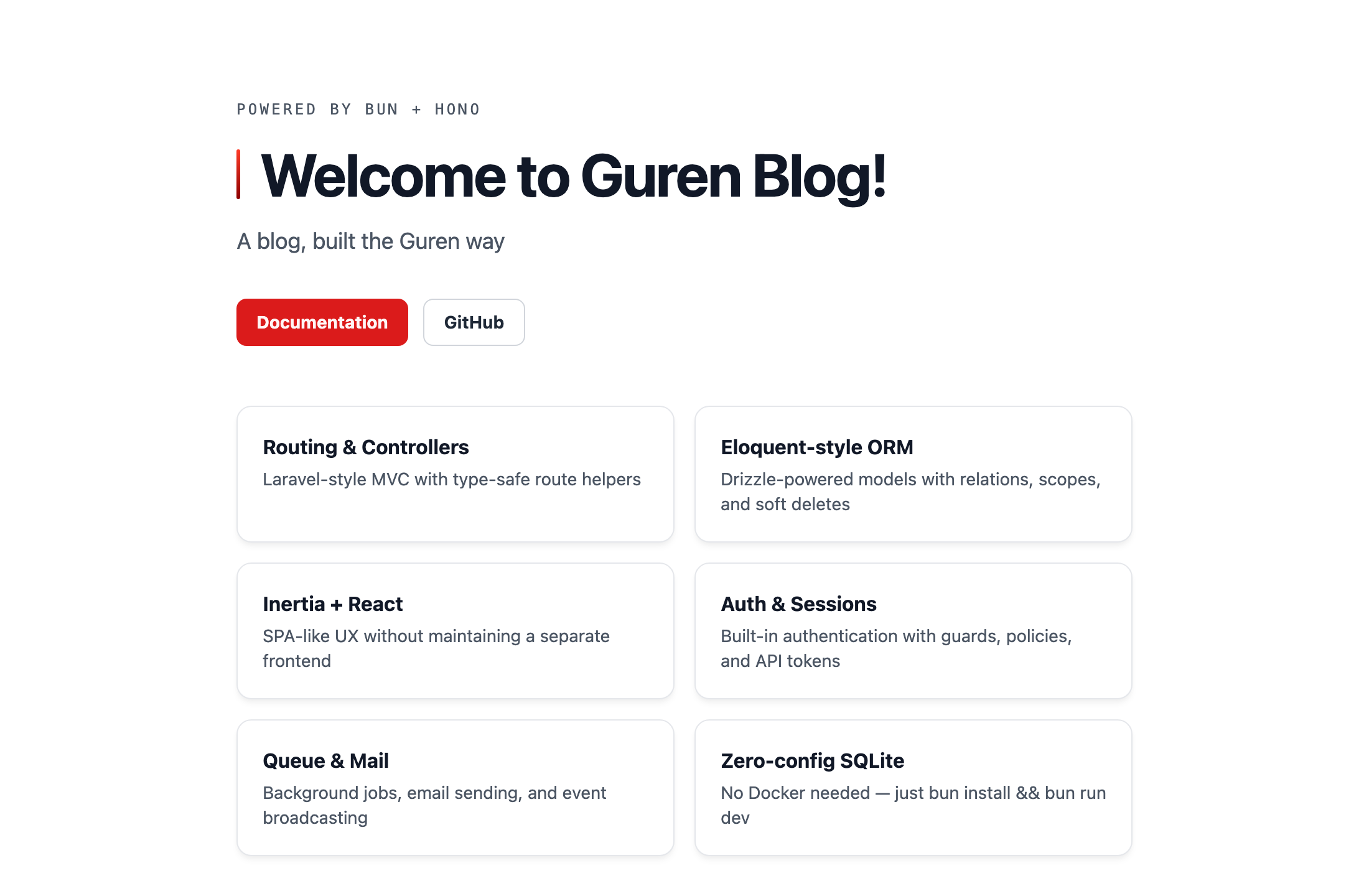
The dev script does three things: regenerates the typed manifests under .guren/ (bun run codegen), then starts the server with GUREN_MCP=1 and GUREN_DOCS=1. Those two flags mount a development-only MCP endpoint at /_guren/mcp and the Docs Graph viewer at /_guren/docs. Chapter 8 connects an agent to the first; chapter 13 fills the second. Neither exists in production.
Keep the dev server running in this terminal. Run everything below in a second one, from inside guren-blog.
3. Read what you were given
A fresh app is small enough to read in one sitting. These are the files this chapter touches:
guren-blog/
├── app/Http/Controllers/HomeController.ts   # the one controller
├── resources/js/pages/Home.tsx              # the one page
├── routes/web.ts                            # the two routes
├── lang/en/messages.json                    # the translation catalog
├── tests/HomeController.test.ts             # the one test
├── .github/workflows/ci.yml                 # CI: one gate
├── CLAUDE.md                                # what an agent reads first
├── .claude/                                 # rules, skills, agents, hooks
└── .mcp.json                                # the dev MCP endpoint
The request path
routes/web.ts maps two URLs. The first names a controller method; the second is a handler written inline, which is fine for a one-liner and nothing bigger:
import { Router } from '@guren/core'
import HomeController from '../app/Http/Controllers/HomeController.js'

export function registerWebRoutes(router: Router): void {
  router.get('/', [HomeController, 'index'])

  // Health check endpoint for load balancers and uptime monitors
  router.get('/health', (c) => c.json({ status: 'ok' }))
}
HomeController.index builds the page's props and renders the page. pages.Home is not a string: it is a typed reference generated from the file under resources/js/pages/, and the props it accepts are the page component's Props interface. Pass a prop the page does not declare, or miss one it requires, and bun run typecheck fails.
import { Controller } from '@guren/core'
import { pages } from '@/.guren/pages.gen'

export default class HomeController extends Controller {
  async index(): Promise<Response> {
    const props = {
      // Message text lives in lang/en/messages.json (key typed by codegen).
      message: this.t('messages.welcome', { name: 'Guren Blog' }),
    }

    return this.inertia(pages.Home, props, { title: 'Guren Blog' })
  }
}
this.t() reads lang/en/messages.json, and its key is typed too: messages.welcome exists, messages.hello does not compile. That is the first of many places where Guren turns a runtime mistake into a compile error.
The test
tests/HomeController.test.ts boots the real src/app.ts and makes requests against it, without a port or a browser:
import { beforeAll, describe, it } from 'bun:test'
import { TestApp } from '@guren/testing'
import app from '../src/app.js'

// Boots the real src/app.ts so tests share its configuration.
describe('app', () => {
  let http: TestApp

  beforeAll(async () => {
    http = await TestApp.fromApp(app)
  })

  it('serves the translated home page', async () => {
    const response = await http.get('/').assertOk()
    await response.assertBodyContains('Welcome to')
  })

  it('answers the health check', async () => {
    await http.get('/health').assertOk()
  })
})
Run it:
bun testTwo tests, both green. From chapter 2 on, you will write a test like this before the code it describes.
The CI workflow
.github/workflows/ci.yml has one step that matters:
      - name: Gate
        run: bunx guren gate --deps
That is the whole CI. Everything it checks, you can run locally with the same command.
4. The gate
bunx guren gategate runs six stages in order and stops at the first failure: codegen (the typed manifests), typecheck, lint, check, audit, and test. Two of them are Guren's own:
guren checkreads the code, not the running app, and verifies that every route names a controller method that exists, everypages.Xnames a page file, every page's props match what its controller sends, and a dozen other things that would otherwise fail at runtime.guren auditis a static security review: mutating routes without validation or authentication, raw SQL, secrets in source, mass assignment. On a fresh app it has nothing to say.
The course leans on one property of these stages: they are the same whether a human or an agent wrote the code. That is what makes the next section possible.
5. The harness
--agents claude wrote CLAUDE.md, .claude/, and .mcp.json. Together they are the agent harness: what an agent reads before it writes, what runs after it edits, and what runs before it is allowed to stop.
Open .claude/settings.json. The part that matters is the three hooks:
{
  "hooks": {
    "SessionStart": [
      { "hooks": [{ "type": "command", "command": "cd \"${CLAUDE_PROJECT_DIR}\" && bunx guren context 2>/dev/null || true" }] }
    ],
    "PostToolUse": [
      {
        "matcher": "Edit|Write|MultiEdit",
        "hooks": [{ "type": "command", "command": "bun \"${CLAUDE_PROJECT_DIR}/.claude/hooks/check-after-edit.ts\"" }]
      }
    ],
    "Stop": [
      { "hooks": [{ "type": "command", "command": "bun \"${CLAUDE_PROJECT_DIR}/.claude/hooks/gate-on-stop.ts\"", "timeout": 300 }] }
    ]
  }
}SessionStartinjects the output ofbunx guren contextinto the agent's context before its first turn: a map of every model, route, controller and page, ending with a digest of the framework's API signatures. The agent starts knowing what the project is, without readingnode_modules.PostToolUseruns after every file edit. If the file is a route, controller, model, schema or page,.claude/hooks/check-after-edit.tsrunsguren checkand hands any findings straight back to the agent, so the fix happens in the same turn.Stopruns when the agent tries to end a turn with uncommitted changes..claude/hooks/gate-on-stop.tsrunsguren gate; if any stage fails, the stop is blocked once and the findings come back. The agent cannot declare a change done while the gate is red.
Claude Code runs a hook in the session's current directory, which moves whenever the agent runs cd. Each command therefore starts from ${CLAUDE_PROJECT_DIR}, the directory the session opened in.
See what the agent sees:
bunx guren contextThe rest of .claude/ is read on demand rather than at start:
rules/hold verified API rules for one area each (orm-models.md,controllers-http.md,routes-codegen.md,testing.md,docs-and-spec.md,comments.md). Each names the files it applies to in itspathsfrontmatter, so the agent loadsroutes-codegen.mdwhen it edits a route and not before.skills/are procedures the agent follows on request, such asscaffold(reach forbunx guren make:*instead of typing a file),feature,db-manage,dev-workflowandplan-write.agents/are two subagents with their own briefs:code-reviewandtest-writer..mcp.jsonpoints the agent at the dev MCP endpoint thedevscript mounted, so it can query the running app.
Each piece is a Claude Code feature with its own page in Claude Code's documentation: hooks (and the hooks guide), CLAUDE.md and rules, skills, subagents, and MCP. Read them when you want the details of a piece beyond what Guren puts in it.
Each later chapter puts one of these to work, and chapter 8 has you write your own. For now, the two hooks are what you are about to watch.
6. Your first change, by hand
Give the home page a tagline. You will do this in the order every later chapter uses: the test first, then the change.
Replace the test file so it also expects the tagline:
tests/HomeController.test.tsimport { beforeAll, describe, it } from 'bun:test'
import { TestApp } from '@guren/testing'
import app from '../src/app.js'

// Boots the real src/app.ts so tests share its configuration.
describe('app', () => {
  let http: TestApp

  beforeAll(async () => {
    http = await TestApp.fromApp(app)
  })

  it('serves the translated home page', async () => {
    const response = await http.get('/').assertOk()
    await response.assertBodyContains('Welcome to')
  })

  it('shows the tagline', async () => {
    const response = await http.get('/').assertOk()
    await response.assertBodyContains('A blog, built the Guren way')
  })

  it('answers the health check', async () => {
    await http.get('/health').assertOk()
  })
})
Run it and watch it fail. This is deliberate: a test that has never failed has never proven anything.
bun testNow make it pass. The tagline is a prop, like the welcome message: the controller sends it, the page declares it in Props and renders it. Replace app/Http/Controllers/HomeController.ts:
app/Http/Controllers/HomeController.tsimport { Controller } from '@guren/core'
import { pages } from '@/.guren/pages.gen'

export default class HomeController extends Controller {
  async index(): Promise<Response> {
    const props = {
      // Message text lives in lang/en/messages.json (key typed by codegen).
      message: this.t('messages.welcome', { name: 'Guren Blog' }),
      tagline: 'A blog, built the Guren way',
    }

    return this.inertia(pages.Home, props, { title: 'Guren Blog' })
  }
}
And replace resources/js/pages/Home.tsx. The two changes are the tagline field in Props and the paragraph that renders it, which takes the place of the scaffold's whole "The Laravel of TypeScript. Edit resources/js/pages/Home.tsx to get started." paragraph; the rest of the page is untouched:
resources/js/pages/Home.tsximport { Head } from '@inertiajs/react'
interface Props {
  message: string
  tagline: string
}

const features = [
  { title: 'Routing & Controllers', desc: 'Laravel-style MVC with type-safe route helpers' },
  { title: 'Eloquent-style ORM', desc: 'Drizzle-powered models with relations, scopes, and soft deletes' },
  { title: 'Inertia + React', desc: 'SPA-like UX without maintaining a separate frontend' },
  { title: 'Auth & Sessions', desc: 'Built-in authentication with guards, policies, and API tokens' },
  { title: 'Queue & Mail', desc: 'Background jobs, email sending, and event broadcasting' },
  { title: 'Zero-config SQLite', desc: 'No Docker needed — just bun install && bun run dev' },
]

export default function Home({ message, tagline }: Props) {
  return (
    <>
      <Head title="Guren Blog" />
      <main className="min-h-screen bg-g-page font-sans text-g-text">
        <div className="mx-auto max-w-3xl px-6 py-20">
          <p className="mb-5 font-mono text-xs tracking-[0.18em] uppercase text-g-text-2">
            Powered by Bun + Hono
          </p>
          <h1 className="mb-4 flex items-center gap-4 text-5xl font-bold tracking-tight text-g-heading">
            <span aria-hidden className="h-10 w-[3px] shrink-0 rounded-full bg-[image:var(--g-tick)]" />
            {message}
          </h1>
          <p className="mb-8 text-lg text-g-text-2">{tagline}</p>

          <div className="mb-12 flex flex-wrap gap-3">
            <a
              href="https://guren.dev/docs"
              className="inline-flex items-center rounded-g-ctl bg-g-accent px-4 py-2 text-sm font-bold text-g-on-accent transition hover:bg-g-accent-down"
            >
              Documentation
            </a>
            <a
              href="https://github.com/gurenjs/guren"
              className="inline-flex items-center rounded-g-ctl border border-g-line-strong bg-g-panel px-4 py-2 text-sm font-bold text-g-text transition hover:border-g-muted"
            >
              GitHub
            </a>
          </div>

          <div className="grid gap-4 sm:grid-cols-2">
            {features.map((f) => (
              <div
                key={f.title}
                className="rounded-g-card border border-g-line bg-g-panel p-5 shadow-g-card"
              >
                <h3 className="mb-1 font-bold text-g-heading">{f.title}</h3>
                <p className="text-sm text-g-text-2">{f.desc}</p>
              </div>
            ))}
          </div>

          <div className="mt-12 rounded-g-card bg-g-ink p-6">
            <h2 className="mb-3 font-mono text-xs tracking-[0.18em] uppercase text-g-on-ink-muted">
              Next steps
            </h2>
            <div className="space-y-2 font-mono text-sm text-g-on-ink">
              <p><span className="text-g-on-ink-muted">$</span> bunx guren add auth</p>
              <p><span className="text-g-on-ink-muted">$</span> bunx guren add resource posts</p>
              <p><span className="text-g-on-ink-muted">$</span> bunx guren make:model Post</p>
            </div>
          </div>
        </div>
      </main>
    </>
  )
}
bun testThree tests, green. Reload the browser: the tagline is there. Had you added tagline to the controller and forgotten the page, or the other way round, bunx guren gate would have stopped at typecheck: the Props interface is what the controller's call is checked against. Run the gate to confirm the whole change holds, then commit:
bunx guren gategit add -A
git commit -m "feat: add a tagline to the home page"7. Hand a change to the agent
Now the same kind of change, done by an agent, with you watching the hooks. Start your agent inside guren-blog (for Claude Code, that is claude). Because of the SessionStart hook, its first message already carries the project map you printed in step 5. Ask it:
Explain this project: what does `bunx guren context` report, which hook runs when you edit `routes/web.ts`, and which one runs when you end a turn with uncommitted changes?Read the answer against .claude/settings.json. It should name all three hooks and what each runs. If it does not mention guren gate, it has not read CLAUDE.md; that is worth knowing about your agent before you hand it work.
Then hand it work:
Move the tagline text out of `HomeController` into `lang/en/messages.json` as `messages.tagline`, and read it through `this.t()` like the welcome message. Keep the tests unchanged and green.Watch for two things in the transcript:
- When the agent edits
HomeController.ts, thePostToolUsehook runsguren checkand reports back. On a clean edit it says nothing; if the agent mistyped the key, thecheckfinding arrives before the agent's next step. - When the agent tries to finish, the
Stophook runsguren gate. Codegen regenerates the typed translation keys, typecheck confirmsmessages.taglineexists, the tests run. Only when every stage is green does the turn end.
No agent handy? Make the same change by hand. The two files:
lang/en/messages.json{
  "welcome": "Welcome to :name!",
  "tagline": "A blog, built the Guren way"
}
app/Http/Controllers/HomeController.tsimport { Controller } from '@guren/core'
import { pages } from '@/.guren/pages.gen'

export default class HomeController extends Controller {
  async index(): Promise<Response> {
    const props = {
      // Message text lives in lang/en/messages.json (keys typed by codegen).
      message: this.t('messages.welcome', { name: 'Guren Blog' }),
      tagline: this.t('messages.tagline'),
    }

    return this.inertia(pages.Home, props, { title: 'Guren Blog' })
  }
}
Either way, review the result before you accept it. This is the rubric every later chapter gives you for the agent's output; the first one is short:
HomeController.tsreads the tagline withthis.t('messages.tagline')and no longer contains the English text.lang/en/messages.jsonhas thetaglinekey. Nothing else changed.tests/HomeController.test.tsis untouched and green.bunx guren gateis green.
bunx guren gategit add -A
git commit -m "refactor: read the tagline from the translation catalog"You have now done the two things the rest of this course alternates between: a change you wrote with a test in front of it, and a change you specified, delegated, and verified.
8. Ship it
Guren writes a production Dockerfile for you:
bunx guren deploy --target dockerOpen the Dockerfile it wrote. It is a two-stage build: the first stage installs everything and runs bun run build; the second copies only what the server reads at runtime (tsconfig.json, which holds the @/ import alias, and bin/, src/, app/, config/, routes/, modules/, db/, lang/, public/, .guren/) into a slim image and starts bun bin/serve.ts with NODE_ENV=production. If you have Docker installed, build and run the image. Stop bun run dev first: the container publishes port 3333, which the dev server holds.
docker build -t guren-blog .
docker run --rm -p 3333:3333 --env-file .env guren-blog
A production start has no banner: once the server is up, the container prints one line, [guren] Listening on http://0.0.0.0:3333. The address is the container's wildcard bind; from your machine it is still localhost:3333. Open http://localhost:3333 again. Same page, but served by the production build of your app from inside a container, on a machine that could be anyone's. Stop it with Ctrl-C. Two caveats, both fixed in chapter 14: the container reads your development .env, and its SQLite file lives inside the container, so it forgets everything when it stops.
Commit the recipe:
git add -A
git commit -m "chore: add the Docker recipe"
Where to host it is your choice, and the course does not depend on it. bunx guren deploy --target fly and --target railway write the extra config those two platforms want beside the same Dockerfile; any host that runs a container image (Render, Koyeb, a VPS with Docker) works with the Dockerfile alone. Chapter 14 walks through a real deployment with Postgres, database-backed sessions and the CI gate in front of it.
Where you are
- A running Guren app with SSR and SQLite, in git, with three commits of your own.
- A test suite you have seen go red and green.
- The gate CI runs, and the knowledge that it is the same one you run.
- A harness that hands
guren checkandguren gatefindings back to an agent before you ever see them. - A Dockerfile.
Common trip-ups
bunx create-guren-appasked me questions anyway. One of the four flags is missing or misspelled. The command above sets all of them; if you omit--giton a non-interactive shell, no repository is created and the commits in this chapter fail with "not a git repository".git commitfails with "Please tell me who you are". Setgit config user.nameandgit config user.emailonce, then rerun the commit.bun testpasses before I changed anything in step 6. You replacedHome.tsxbefore running the red step. Order matters: test first, watch it fail, then the change.- The agent's
Stophook did not run. It runs only when the tree has uncommitted changes. An agent that commits before ending its turn is not gated by the hook; that is why the chapter has you runbunx guren gateyourself before committing. - Port 3333 is busy. The dev server walks forward to the next free port and prints the one it bound. Read the banner rather than assuming.
Exercises
Nothing below is needed by a later chapter. Where an exercise changes a file, do it on a branch (git switch -c exercise/…), and when you are done undo the work, not just the branch: git switch main, then git reset --hard and git clean -fd (git clean -fdn first shows what that would remove), then git branch -D exercise/…. A branch you never committed to holds nothing, so deleting it removes nothing: your edits and any new files are still in the working tree. reset --hard rather than restore because it covers what you staged along the way as well as what you only edited. That matters most for anything left under db/migrations/, which the next bun run dev applies to your database without asking.
- The workflow the scaffold wrote runs
bunx guren gate --deps, and you have been runningbunx guren gate. Run the longer one. What does--depsadd, and what would it do on a machine with no network? - Run
bunx guren doctor --next. Pick one thing it reports and say what changing it would buy you. Some of its suggestions are for a production app you have not built yet; say which.
Exercise 1: hint and an example answer
Read the Gate step in .github/workflows/ci.yml and the comment above it, then compare the audit line the gate prints with and without the flag.
--deps adds a dependency scan to the audit stage. It runs bun audit against the npm advisory database, and the stage line reads audit + dependency scan. A high or critical advisory fails the stage; a lower one is only a warning. The scan needs the npm registry. With no network it cannot run, and that is reported as a warning, not a failure. The gate prints only failing findings, so gate --deps still goes green on that machine without having scanned anything. To see the warning, run bunx guren audit, which scans dependencies by default (--no-deps turns the scan off). That is why the workflow's comment tells you to drop --deps on a runner that cannot reach the registry.
Exercise 2: hint and an example answer
The report has two parts: the checks, each marked ok, warn or fail with a Fix line under anything that is not ok, and, because of --next, a numbered "Next steps" list.
One answer: the next steps include "Run the security audit", which doctor suggests whenever the app has a controller. Running bunx guren audit buys you a list of mutating routes that lack validation or authentication. This app has none yet, but from chapter 3 on it will, and the gate runs the same audit. The production ones are the checks whose titles start with "Deploy" (password hashing, runtime stores, provider discovery). They judge an app that declares a deploy plugin or the Lambda adapter, and on this app they pass because it declares neither. They start to matter when the app is deployed to a serverless host. Your report may list other items, and other answers are possible.
Next
Chapter 2: One Request, by Hand builds a route, a controller and a page from blank files, with a test in front, and then hands the second page to the agent.